
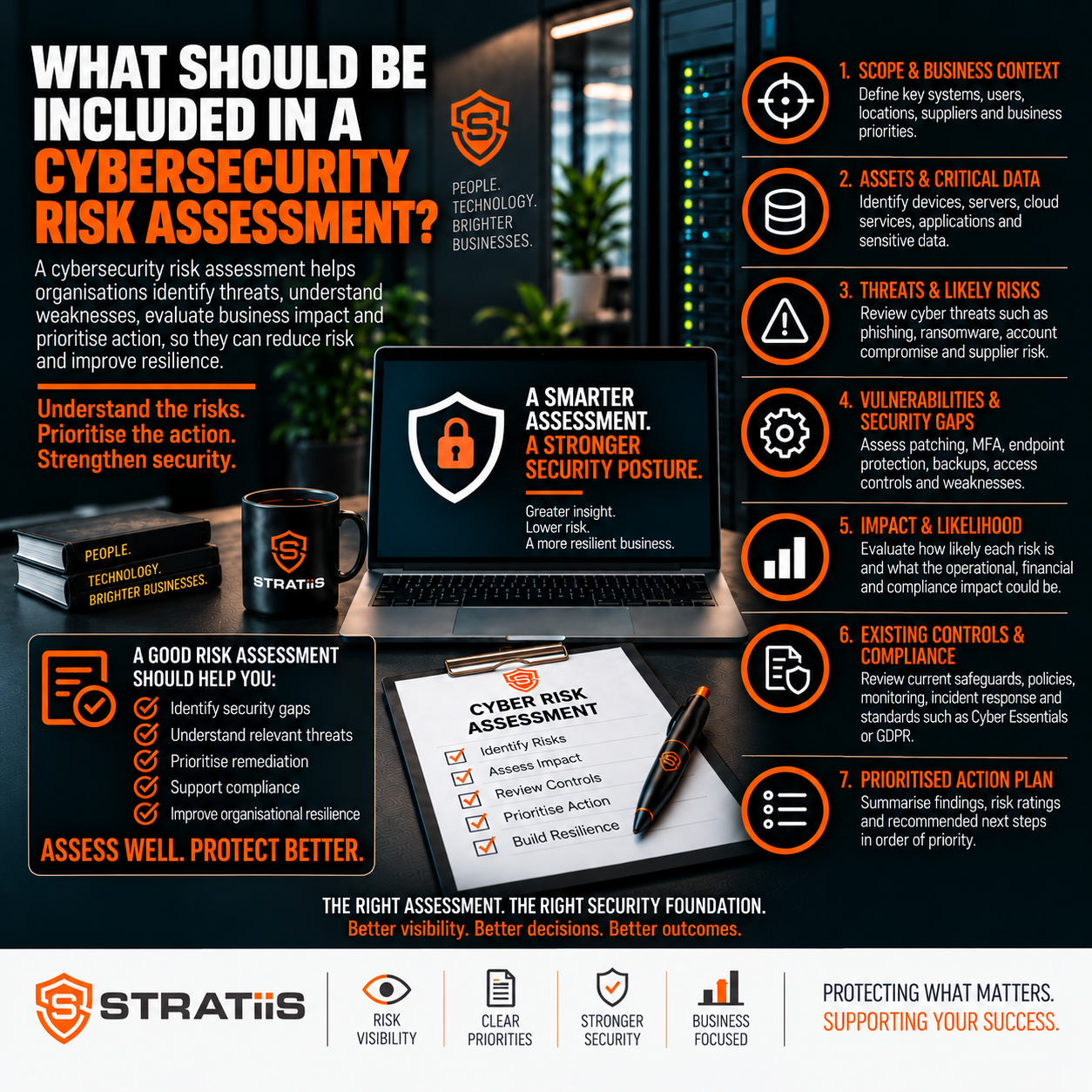
A cybersecurity risk assessment should identify the systems and data your organisation depends on, the threats and weaknesses that could affect them, the controls already in place and the actions that will reduce risk. The final result should be a prioritised business plan with clear owners and target dates.
What should a cybersecurity risk assessment include?
It should cover business-critical systems, sensitive data, identity and access, Microsoft 365, endpoints, email, networks, mobile and remote working, backups, recovery, employees, suppliers, monitoring, vulnerabilities and incident response. Each significant finding should explain likelihood, business impact, existing controls, recommended action, priority, owner and target date.
In this guide
START WITH THE BUSINESS
What Is a Cybersecurity Risk Assessment?
A cybersecurity risk assessment is a structured review of the threats, vulnerabilities and controls affecting an organisation’s technology and information. It should help leaders answer three practical questions: what are we protecting, what could realistically go wrong and what should we address first?
Useful assessment
Connects technical findings to operational, financial, customer, compliance and reputational impact, then gives management a clear order of action.
Weak assessment
Uses a generic checklist, focuses on products such as antivirus and leaves the business without priorities, owners or a remediation plan.
The objective is a defensible understanding of risk. It is not a promise that every threat can be eliminated.
UNDERSTAND WHAT MATTERS
Which Systems, Data and Threats Should Be Assessed?
Critical services
Identify Microsoft 365, email, finance, CRM, ERP, specialist applications, servers, cloud platforms, connectivity and telephony that operations depend on.
Important information
Map customer, employee, payroll, financial, supplier, legal, project and intellectual-property data, including where it is stored and shared.
Realistic attack paths
Consider phishing, business email compromise, ransomware, credential theft, malicious or accidental insiders, lost devices, suppliers and data leakage.
Business consequences
Assess downtime, financial loss, privacy harm, customer disruption, regulatory exposure and reputational damage.
Business ownership
Record who relies on each service and who can decide how a risk will be treated.
Current context
Include growth, acquisitions, remote work, new systems, supplier changes and previous incidents that alter exposure.
Prioritisation should follow business dependency. A modest-looking weakness in a service that stops operations may deserve more attention than a technically severe issue on an isolated system.
REVIEW THE CONTROL ENVIRONMENT
Which Technical Security Controls Should Be Checked?
MFA, Conditional Access, administrator roles, legacy authentication, external sharing, forwarding, suspicious sign-ins and device compliance.
User, administrator, shared, service and third-party accounts; joiners, role changes, leavers, privileges and password management.
EDR or antivirus, encryption, supported operating systems, secure configuration, local administrators and management coverage.
Windows, servers, business applications, firewalls and network equipment, including failed patches and unsupported software.
Spam, phishing, impersonation, malicious links and attachments, plus SPF, DKIM, DMARC and active alert monitoring.
Supported firewalls, secure remote access, segmentation, switches, Wi-Fi, guest access and exposed services.
Encryption, screen locks, MDM or Intune, application controls, remote wipe and lost-device procedures.
Managed devices, home networks, public Wi-Fi, VPN use, personal devices and the strength of off-site access controls.
Assessment evidence should be tested where possible. A written policy saying MFA is required is weaker evidence than configuration showing it is enforced for the relevant accounts.
Related guidance includes Accounts and MFA and Devices and Remote Work.
PREPARE FOR DISRUPTION
How Should Backup, Recovery and Business Continuity Be Assessed?
Backup assurance
Confirm what is protected, frequency, retention, storage location, Microsoft 365 coverage, monitoring, immutability where appropriate and whether restores are tested.
Recovery readiness
Define which systems return first, acceptable downtime and data loss, responsible people, technical dependencies and the evidence from recovery exercises.
Business continuity should consider ransomware, cloud and internet outages, device or server failure and supplier disruption. The assessment should identify which processes can continue manually and which depend completely on technology.
PEOPLE, ACCESS AND SUPPLY CHAIN
What Organisational Risks Should Be Included?
Security awareness
Review training on phishing, impersonation, passwords, payment changes, data handling and how staff report concerns.
Phishing exercises
Use results to guide learning, follow-up and improvement over time rather than treating people as a pass or fail statistic.
Joiners and leavers
Check approvals, account creation, device setup, licence allocation, access changes, session revocation and prompt removal.
External access
Identify suppliers, contractors and consultants with access, then verify need, MFA, time limits and activity logging.
Supplier risk
Understand what critical providers can access, what happens if they are compromised and how assurance is obtained.
Policies and governance
Review practical policies for acceptable use, identity, remote work, mobile devices, backup, incidents, data and AI use.
See Awareness Training, Phishing and Impersonation and Data and Sharing.
FIND AND HANDLE PROBLEMS
Should Monitoring, Vulnerabilities and Incident Response Be Reviewed?
Yes. Prevention is only part of security. The assessment should determine whether suspicious activity is visible, who reviews alerts and how the organisation responds when a control fails.
Microsoft 365 sign-ins, endpoint alerts, firewalls, administrator actions, failed logins and critical cloud services.
Who monitors events, what hours are covered and how urgent activity is escalated.
Internal and external scanning, patch compliance, configuration reviews, assessments and penetration testing where justified.
How findings are validated, prioritised, assigned, tracked and retested.
Leadership, technical containment, management reporting, legal or insurance contacts and external communication.
How devices are isolated, accounts secured, evidence preserved, services recovered and lessons recorded.
Explore Monitoring and Response and Reporting Concerns.
PRIORITISE WITH CONSISTENT RULES
How Should Cybersecurity Risks Be Scored?
A simple likelihood and impact model is often sufficient for a small or medium-sized organisation. The assessment should describe the scoring method so different findings can be compared consistently.
| Consideration | Questions to answer |
|---|---|
| Likelihood | How exposed is the weakness, how easy is exploitation and has similar activity occurred? |
| Impact | Could it disrupt operations, cause fraud, expose data, harm customers or breach obligations? |
| Existing controls | What currently prevents, detects or limits the event, and how reliable is the evidence? |
| Residual risk | What risk remains after current controls are considered? |
| Priority | How quickly should the business act, and what dependencies affect the response? |
A risk that is easy to exploit and could stop the business should normally be addressed before a low-impact configuration issue.
TURN FINDINGS INTO DECISIONS
What Should the Final Risk Assessment Report Contain?
Executive summary
A concise, non-technical explanation of the current risk position and the decisions management needs to make.
Scope and method
Systems, locations, data, people and suppliers reviewed, evidence used, limitations and the scoring approach.
Clear findings
Describe each weakness, affected assets, threat scenario, existing controls and supporting evidence.
Business impact and rating
Explain why the issue matters and assign a consistent critical, high, medium or low priority.
Recommended action
State the practical remediation, expected risk reduction, dependencies and any alternative treatment.
Owner and target date
Assign accountability and an achievable completion date so progress can be reviewed.
The report should include a risk register that leaders can maintain, with status, evidence and review dates. A document that cannot be converted into managed actions has limited value.
MOVE FROM REVIEW TO IMPROVEMENT
What Should Happen After the Assessment?
| Timeframe | Typical focus |
|---|---|
| Immediate | Protect administrator accounts, enforce MFA, address actively exploitable weaknesses and restore failed protection. |
| Short term | Improve email and Microsoft 365 security, remove unsupported technology and strengthen endpoint coverage. |
| Medium term | Improve continuity, vulnerability management, network design, supplier assurance and incident response. |
| Ongoing | Track risk owners, review evidence, retest completed actions and report progress to leadership. |
For many small and mid-sized organisations, a formal assessment should be completed at least annually and reviewed after major changes such as an acquisition, new office, cloud migration, serious incident or change of IT provider.
Participants should include people who understand operations, finance, HR, compliance, data and technology. Senior leaders need to understand and accept the final priorities.
QUALITY CHECK
What Are the Warning Signs of a Poor Assessment?
It does not reflect the organisation’s services, information, people or suppliers.
It concentrates on antivirus while ignoring identity, cloud, backup, recovery and human risk.
Findings are technical statements without explaining operational or financial consequences.
Conclusions rely on policy or assumption without checking configurations, records or coverage.
Every issue looks equally urgent, leaving management unable to decide where to invest.
There are no practical actions, owners, target dates or follow-up arrangements.
FREQUENTLY ASKED QUESTIONS
Questions About Cybersecurity Risk Assessments
Does a small business need an assessment?
Yes. Smaller organisations still depend on email, cloud services, finance systems, customer data and remote access that can create material risk.
How often should it be repeated?
At least annually for many organisations, plus after significant business, technology or threat changes.
Who should be involved?
Operational, finance, HR, compliance, data and technology representatives, with senior management reviewing the main risks.
Is a vulnerability scan enough?
No. Scanning can identify technical weaknesses but does not assess business impact, people, suppliers, recovery or governance.
Should cyber insurance be included?
Yes. Verify that controls such as MFA, EDR, backup, awareness and incident response match declarations and policy conditions.
Does the assessment eliminate risk?
No. It helps leaders understand, prioritise, reduce, transfer or consciously accept risk using better evidence.
Need a Clear View of Your Cyber Risk?
Stratiis can review your users, devices, Microsoft 365 environment, networks, suppliers, backup and continuity arrangements, then provide a prioritised improvement plan.


