
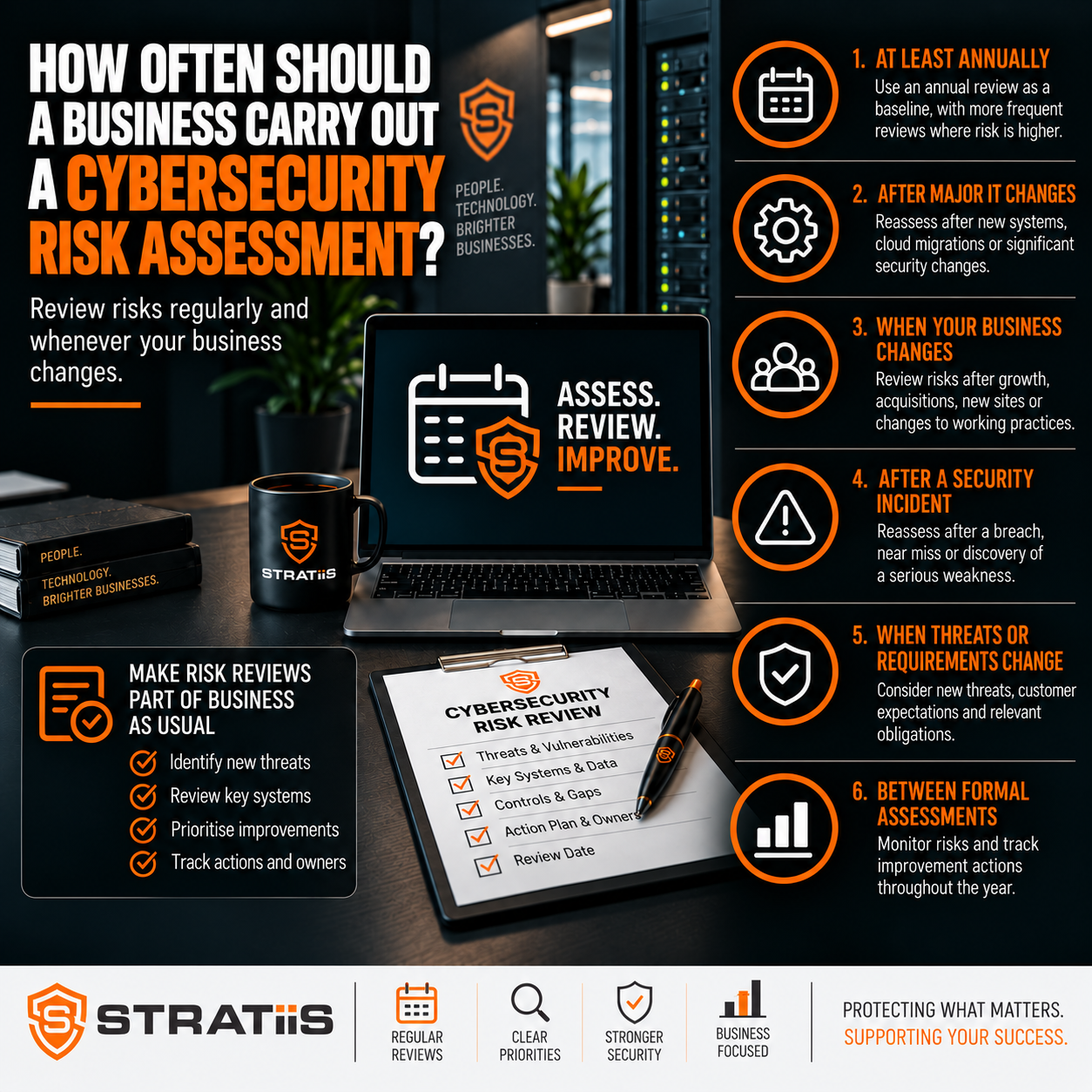
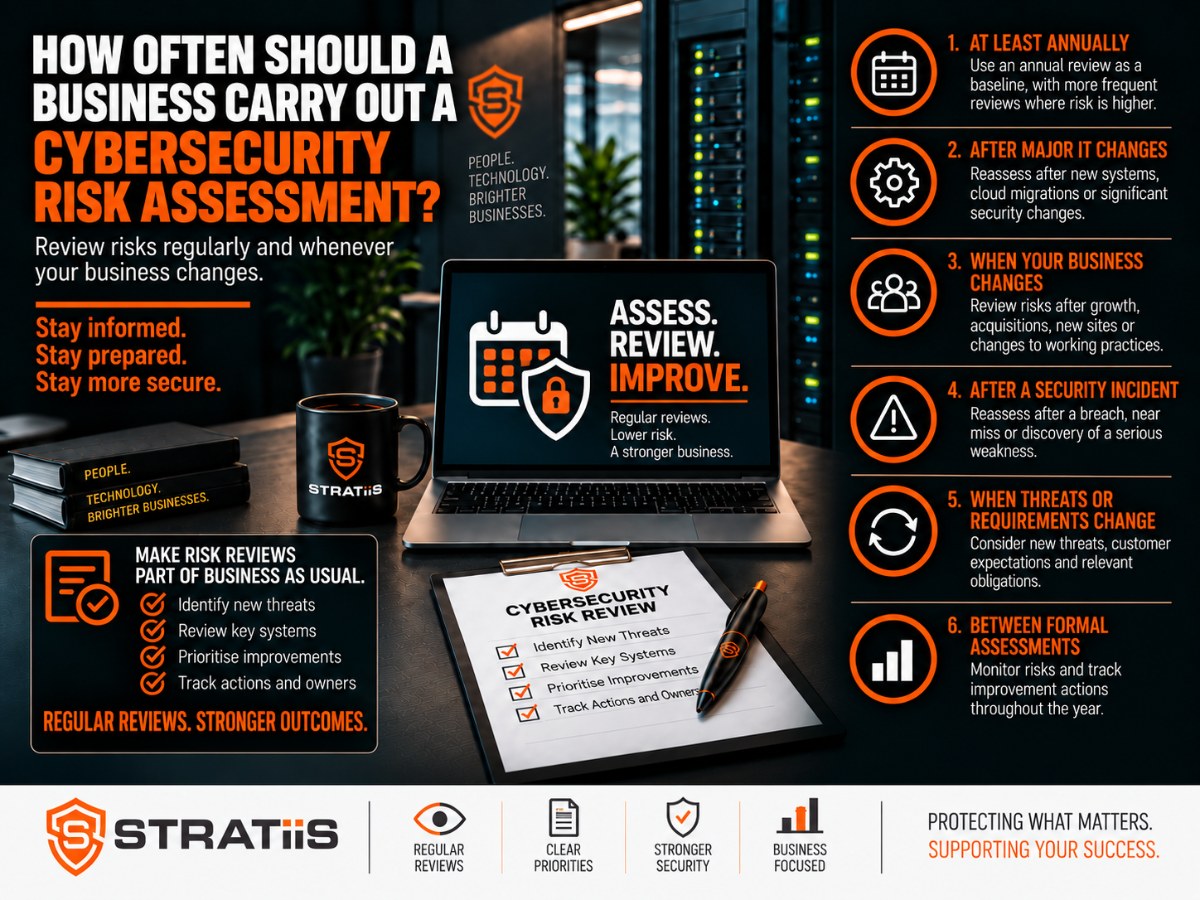
Most small and mid-sized businesses should complete a formal cybersecurity risk assessment at least once a year. They should also carry out a targeted review after a serious incident, major technology or supplier change, rapid growth, an acquisition, a new office or a significant change in working practices.
How often should a business carry out a cybersecurity risk assessment?
Use an annual formal assessment as the minimum baseline. Support it with quarterly security and access reviews, monthly patch and vulnerability checks, continuous security monitoring and additional risk assessments whenever material change occurs. Higher-risk or fast-changing organisations may need a formal review every six months.
In this guide
SET A RELIABLE BASELINE
Is an Annual Cybersecurity Risk Assessment Enough?
An annual assessment is a sensible minimum for many smaller organisations because it creates a structured opportunity to review business-critical systems, sensitive data, Microsoft 365, identities, devices, networks, suppliers, backup, continuity and incident response.
Annual formal assessment
Provides a complete view of business risk, records evidence, scores findings and creates a prioritised remediation plan with owners and target dates.
Reviews between assessments
Respond to changes, incidents, vulnerabilities, new users, leavers and warning signs that should not wait for the next anniversary.
The right approach combines both. An organisation that reviewed security 12 months ago may since have added cloud systems, remote workers, suppliers, locations or new ways of using data.
See What Should Be Included in a Cybersecurity Risk Assessment? for the recommended scope.
REVIEW AFTER MATERIAL CHANGE
When Should You Carry Out an Additional Assessment?
After a cyber incident
Reassess after account compromise, phishing, ransomware, malware, a data breach or suspicious administrator activity. Identify why controls failed and whether the weakness exists elsewhere.
After changing IT provider
Review Microsoft 365, administrator access, endpoints, patching, backup, email and networks to uncover inherited gaps and undocumented risk.
After a major cloud change
Tenant migration, SharePoint, Intune, Conditional Access, Teams, permissions and new AI tools can all alter identity, sharing and data risk.
After opening a location
Assess new internet services, firewalls, Wi-Fi, network equipment, devices, physical access and remote administration.
After an acquisition or merger
Identify unknown devices, legacy servers, unsupported software, unmanaged accounts, suppliers, weak policies and untested backups before integration.
After significant growth
More employees, devices, applications, permissions, sites and data increase both exposure and the impact of disruption.
After changing working practices
Remote and hybrid work need suitable device management, MFA, home-working controls, secure access and support arrangements.
After a critical system launch
Review authentication, permissions, backup, recovery, supplier controls, integrations and data movement for CRM, ERP, finance, payroll or document systems.
After a supplier change
Confirm what the supplier can access, how privileges are controlled, what evidence is available and what happens if the service fails or is compromised.
Before assurance or renewal
Verify the live environment before cyber insurance renewal, Cyber Essentials certification, major tenders or customer security reviews.
After a major IT project
Cloud migrations, server replacement, new Wi-Fi, phone systems and digital transformation projects should end with security validation.
When the threat changes
Act when a serious vulnerability, supplier incident or attack pattern creates a credible new risk to the organisation.
Related planning includes Mergers and Acquisitions, Modern Workplace Deployments and Vendor Management.
MATCH FREQUENCY TO EXPOSURE
Should Higher-Risk Businesses Assess More Frequently?
Yes. A six-monthly formal review may be appropriate when the organisation handles sensitive or high-volume data, provides essential services, has many locations, relies on complex suppliers or is changing quickly.
Customer, beneficiary, legal, financial, health, payroll or commercially valuable data increases potential harm.
Technology failure would stop manufacturing, customer support, field operations, payments or another essential service.
Frequent hiring, acquisitions, new sites, applications, AI tools and suppliers make an annual snapshot age quickly.
Large numbers of administrators, contractors, remote workers or third parties create more paths to critical systems.
Contracts, insurers, certification schemes and regulators may require more frequent evidence and review.
A recent compromise or repeated near miss can justify shorter review cycles until remediation is proven.
A stable 20-person organisation may be well served by an annual assessment with routine checks. A fast-growing 100-person organisation with multiple sites and cloud platforms may need quarterly risk meetings and formal six-monthly reviews.
USE A LAYERED REVIEW CYCLE
A Practical Cybersecurity Review Schedule
| Frequency | Recommended focus |
|---|---|
| Continuous or daily | Security alerts, suspicious sign-ins, endpoint detections, backup failures and other events requiring prompt action. |
| Monthly | Patch compliance, vulnerability findings, failed protection, unsupported technology and overdue remediation. |
| Quarterly | Microsoft 365, privileged access, leavers, supplier accounts, security trends, backup status and risk register progress. |
| Six-monthly | Higher-level risk review for organisations with greater exposure, complexity or pace of change. |
| Annually | Full formal cybersecurity risk assessment, policy review, recovery testing and leadership review. |
| After major change | Targeted assessment of the affected systems, data, suppliers, people and recovery arrangements. |
This schedule is a starting point. The organisation should shorten any interval where delay could allow a significant risk to remain unnoticed or untreated.
REVIEW THE WHOLE ENVIRONMENT
What Should the Annual Assessment Cover?
Systems and data
Critical services, sensitive information, business dependencies, owners, locations and the impact of loss or disruption.
Identity and permissions
Users, administrators, MFA, Conditional Access, joiners, leavers, service accounts and external access.
Endpoints and servers
Management coverage, EDR, encryption, supported systems, secure configuration, patching and local administrators.
Email and Microsoft 365
Sharing, forwarding, suspicious sign-ins, application consent, tenant controls and protection against impersonation.
Networks and remote work
Firewalls, Wi-Fi, segmentation, remote access, internet exposure, mobile devices and home-working controls.
Backup and continuity
Coverage, retention, immutability, restore evidence, recovery order, recovery time and tested response arrangements.
Awareness and process
Training, phishing, payment changes, data handling, reporting concerns and lessons from incidents.
Suppliers and applications
Third-party access, assurance, contracts, critical dependencies, integration and exit or continuity planning.
Monitoring and incidents
Logging, alert ownership, escalation, containment, communications, evidence, recovery and post-incident learning.
KEEP THE BASELINE CURRENT
What Should Be Reviewed Quarterly?
Confirm starters, role changes, leavers, dormant accounts and temporary access have been handled correctly.
Verify privileged accounts, MFA, separate admin identities, emergency access and unnecessary permissions.
Review Conditional Access, external sharing, risky sign-ins, forwarding, application consent and security alerts.
Track critical findings, failed updates, unsupported software and remediation that remains overdue.
Review failures, exclusions, retention, test restores and any change to critical data or systems.
Check open risks, attempted attacks, user reports, supplier issues and progress against target dates.
Guidance for these checks is available through Accounts and MFA, Reporting Concerns and Monitoring and Maintenance.
USE DIFFERENT CONTROLS FOR DIFFERENT JOBS
Risk Assessment, Vulnerability Scanning and Monitoring
| Activity | Purpose | Typical cadence |
|---|---|---|
| Risk assessment | Connect threats and control weaknesses to business impact, then prioritise action. | At least annually and after material change. |
| Vulnerability scanning | Find known technical weaknesses and missing updates across relevant systems. | Monthly, quarterly and after significant changes according to risk. |
| Security monitoring | Detect suspicious activity, malware, risky sign-ins and control failures as they happen. | Continuous or as close to real time as the risk requires. |
| Recovery testing | Prove that important data, systems and communications can be restored within the required time. | At least annually for many organisations and more often for critical services. |
| Awareness activity | Keep employees prepared for phishing, impersonation, payment fraud and data-handling risks. | Annual formal learning supported by short refreshers and exercises. |
These activities complement each other. Continuous monitoring cannot replace a business risk assessment, and an annual assessment cannot detect an attack that begins tomorrow. Explore Monitoring and Response and Awareness Training.
KEEP LEADERSHIP ACCOUNTABLE
Who Should Review Cybersecurity Risk?
Cybersecurity risk should not sit entirely with the IT provider. The assessment needs technical evidence and business judgement from leadership, operations, finance, HR, internal IT, relevant data owners and specialist providers.
Assess
Identify important assets, realistic threats, weaknesses, existing controls and business impact.
Prioritise
Decide which risks need immediate, short-term or planned treatment using consistent scoring.
Assign
Give every material action an accountable owner, funding decision and achievable target date.
Improve
Implement proportionate technical, operational, supplier and people controls.
Monitor and review
Track evidence, incidents, changing conditions and residual risk, then repeat the cycle.
Directors should see the critical and high risks, business impact, treatment decision, cost, owner and progress. Significant risks belong on the organisation’s main risk register, with likelihood, impact, mitigation and review date.
KNOW WHEN THE PICTURE IS STALE
What Are the Signs an Assessment Is Overdue?
There is no current assessment or scheduled review date.
Growth, new locations, suppliers, systems, remote work or AI have altered the environment.
The organisation restored service but did not reassess related weaknesses and control failures.
Management cannot see material cyber risks, owners, actions and target dates.
No one can demonstrate MFA enforcement, device coverage, patch status, backup restoration or alert handling.
Directors receive technical activity reports without a clear view of business exposure and priorities.
FREQUENTLY ASKED QUESTIONS
Questions About Cybersecurity Assessment Frequency
How often should a small business assess cyber risk?
At least annually, with additional reviews after significant changes or incidents. Routine monitoring and access checks should happen more frequently.
Is annual assessment enough?
It can be a suitable formal baseline for a stable smaller business, but risks created during the year should be reviewed when they arise.
When is a six-monthly review appropriate?
When the organisation has sensitive data, complex suppliers, essential services, previous incidents or a fast rate of business and technology change.
How often should Microsoft 365 be reviewed?
Many organisations benefit from a quarterly configuration and access review, supported by ongoing monitoring of alerts and risky sign-ins.
How often should disaster recovery be tested?
At least annually for many small and mid-sized organisations, and more frequently where service availability is critical.
Does monitoring replace an assessment?
No. Monitoring detects events, while the assessment examines business exposure, control design, priorities and the risk that remains.
Is Your Cybersecurity Assessment Due?
Stratiis can review your Microsoft 365 environment, users, devices, networks, suppliers, backup and recovery arrangements, then provide a prioritised improvement plan.


