
Many organisations reach a point where their internal IT team simply can't do everything.
Perhaps your IT manager is overwhelmed with support tickets. Maybe your team lacks specialist cybersecurity expertise. Or perhaps strategic projects keep getting delayed because day-to-day support always takes priority.
If that sounds familiar, co-managed IT may be the solution.
Co-managed IT allows organisations to combine the strengths of an internal IT team with the expertise and resources of an external IT provider. Instead of choosing between hiring more staff or fully outsourcing IT, co-managed IT offers a flexible middle ground.
In this guide, we'll explain what co-managed IT is, how it works, who it's best suited for, and whether it's the right approach for your organisation.
What Is Co-Managed IT?
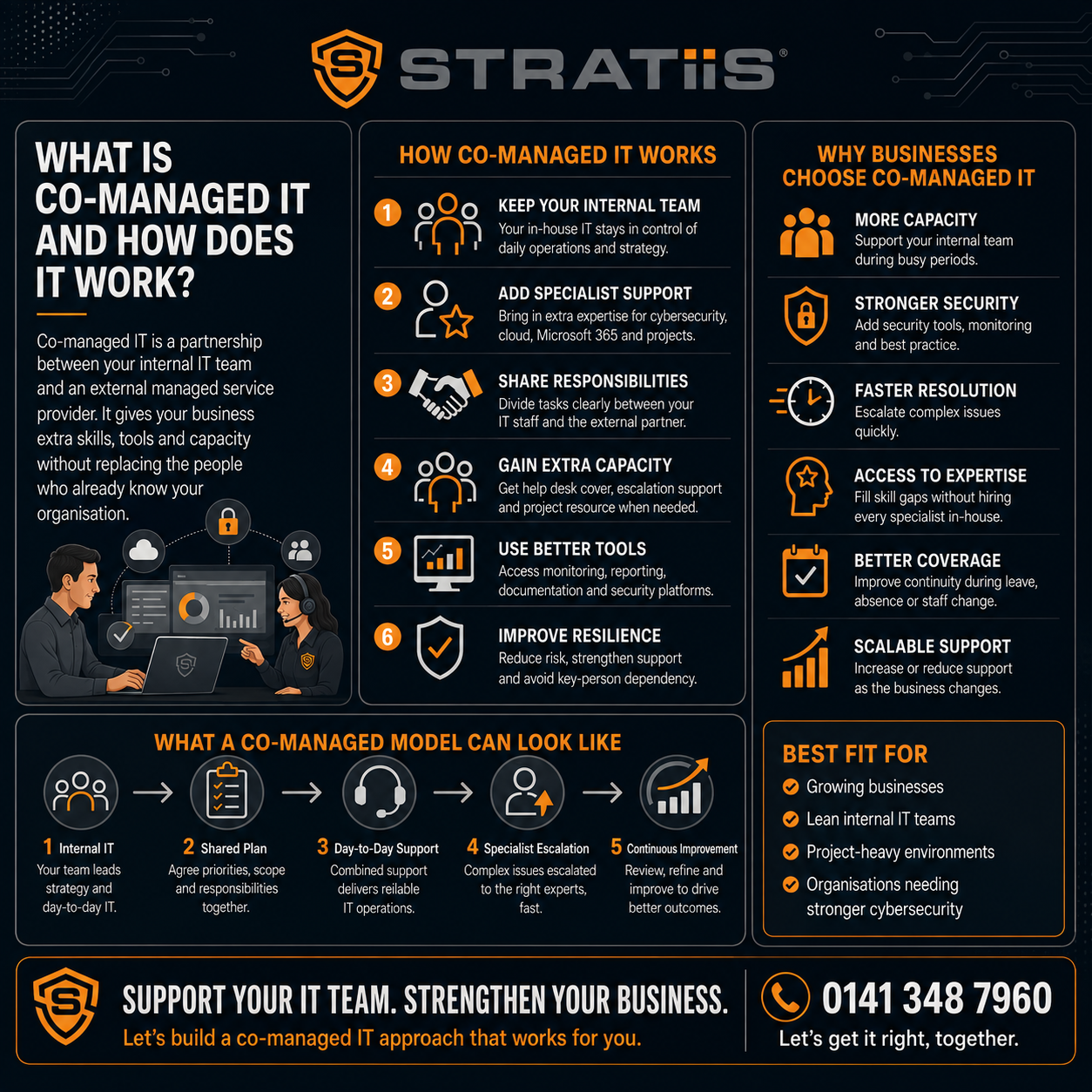
Co-managed IT is a partnership between your internal IT team and an external Managed Service Provider (MSP).
Rather than replacing your internal IT staff, the MSP works alongside them to provide additional expertise, capacity, tools, and support.
Think of it as extending your IT department without hiring additional full-time employees.
Your internal team remains in control of IT strategy and business priorities, while the MSP provides support where it's needed most.
This might include:
- Cybersecurity management
- Microsoft 365 support
- Infrastructure management
- Helpdesk overflow
- Backup and disaster recovery
- Cloud services
- Strategic IT planning
- Project delivery
The arrangement is tailored to the needs of each organisation.
How Does Co-Managed IT Work?
There is no one-size-fits-all model.
Every organisation has different skills, resources, and priorities.
However, most co-managed IT partnerships follow one of four common approaches.
Model 1: Helpdesk Support
Your internal IT team handles strategic work while the MSP assists with:
- User support
- Routine IT requests
- Device management
- Ticket overflow
This reduces pressure on internal resources and improves response times.
Model 2: Specialist Expertise
Many internal IT teams have strong general IT knowledge but need support in specialist areas such as:
- Cybersecurity
- Microsoft 365
- Azure
- Networking
- Compliance
The MSP acts as a technical escalation point when advanced expertise is required.
Model 3: Project Delivery
Internal teams often struggle to find time for major projects.
A co-managed provider can assist with:
- Microsoft 365 migrations
- SharePoint deployments
- Cloud migrations
- Infrastructure upgrades
- Cybersecurity initiatives
This helps organisations complete projects faster without distracting internal staff from daily operations.
Model 4: Strategic Partnership
Some organisations use co-managed IT as an extension of their IT department.
The MSP provides:
- Strategic guidance
- Technology roadmaps
- Security reviews
- Vendor management support
- Capacity planning
This model is particularly popular among growing organisations.
Who Is Co-Managed IT Best Suited For?
Co-managed IT is most effective for organisations that already have some internal IT capability.
Typical examples include:
Growing Businesses
Companies that have outgrown a single IT person but are not yet ready to build a larger internal team.
Housing Associations
Organisations with dedicated IT resources that need support with cybersecurity, compliance, and Microsoft 365.
Charities and Nonprofits
Nonprofits that need specialist expertise without the cost of hiring multiple IT specialists.
Manufacturing Companies
Businesses that require support across production systems, cybersecurity, cloud services, and business applications.
Law Firms
Legal practices that need additional security expertise to protect confidential client information.
What Are the Benefits of Co-Managed IT?
Access to a Wider Range of Skills
One internal IT manager cannot be an expert in everything.
Co-managed IT provides access to specialists in:
- Cybersecurity
- Cloud platforms
- Microsoft 365
- Networking
- Backup and recovery
- Compliance
Improved Cybersecurity
Many internal IT teams struggle to keep up with evolving cyber threats.
A co-managed partner can help implement:
- Multi-Factor Authentication (MFA)
- Security monitoring
- Microsoft 365 security controls
- Vulnerability management
- Cyber Essentials requirements
Increased Capacity
Instead of hiring another full-time employee, organisations can access additional resources as needed.
Better Project Delivery
Major projects are less likely to be delayed because of competing operational priorities.
Reduced Recruitment Challenges
Hiring experienced IT professionals can be expensive and time-consuming.
Co-managed IT provides immediate access to expertise without recruitment costs.
What Are the Potential Drawbacks?
Like any model, co-managed IT isn't perfect for every organisation.
Potential challenges include:
Shared Responsibility
Success depends on clear communication and defined responsibilities.
Choosing the Right Partner
Not all MSPs are experienced in working alongside internal IT teams.
Process Alignment
The MSP and internal team need agreed processes and expectations.
The good news is that these challenges can usually be addressed through proper planning and governance.
Co-Managed IT vs Fully Managed IT
One of the most common questions organisations ask is how co-managed IT differs from traditional managed services.
Fully Managed IT
The MSP is responsible for most or all IT functions.
Best suited for organisations without an internal IT team.
Co-Managed IT
The MSP works alongside internal IT staff.
Best suited for organisations with existing IT resources that need additional support.
Simple Rule
If you already have an IT manager or IT team, co-managed IT is often worth considering.
If you have little or no internal IT capability, fully managed IT may be more appropriate.
Is Co-Managed IT Cheaper Than Hiring Another IT Employee?
In many cases, yes.
Hiring an experienced IT professional typically costs:
- £40,000–£70,000+ salary
- Pension contributions
- National Insurance
- Training and certifications
- Recruitment costs
The total cost can easily exceed £50,000–£85,000 per year.
By comparison, co-managed IT provides access to multiple specialists for a predictable monthly cost.
Many organisations find they gain broader expertise without increasing headcount.
How It Works
Imagine a housing association with:
- One internal IT manager
- 80 employees
- Microsoft 365
- Cyber Essentials requirements
- Growing cybersecurity concerns
The IT manager is responsible for support, projects, compliance, cybersecurity, and supplier management.
Rather than hiring a cybersecurity specialist and a second support technician, the organisation partners with a co-managed IT provider like Stratiis.
The MSP takes responsibility for:
- Security monitoring
- Microsoft 365 management
- Cyber Essentials support
- Technical escalations
The IT manager focuses on strategic priorities and internal stakeholder engagement.
The result is improved security, reduced workload, and better use of internal resources.
Common Signs You Need Co-Managed IT
You may benefit from co-managed IT if:
- Your IT team is overloaded
- Projects are constantly delayed
- Cybersecurity concerns are increasing
- You rely heavily on one IT employee
- You need specialist expertise
- Recruitment is difficult
- Business growth is outpacing IT resources
If several of these sound familiar, it may be time to explore a co-managed model.
Frequently Asked Questions
Does Co-Managed IT Replace Internal IT Staff?
No.
The purpose is to support and strengthen your internal team, not replace it.
Can We Choose Which Services We Outsource?
Yes.
Most co-managed arrangements are highly flexible.
Can We Keep Control of IT Decisions?
Absolutely.
Your organisation remains in control of strategy, priorities, and decision-making.
Is Co-Managed IT Suitable for Small Organisations?
It can be, but it is most commonly used by organisations with an existing IT manager or internal IT resource.
Final Thoughts
Co-managed IT provides a practical middle ground between hiring additional IT staff and fully outsourcing IT support.
By combining internal knowledge with external expertise, organisations can improve cybersecurity, increase capacity, accelerate projects, and gain access to specialist skills without significantly increasing headcount.
For organisations with an internal IT manager or small IT team, co-managed IT often delivers the flexibility and expertise needed to support growth while reducing pressure on internal resources.
The key is finding a partner that complements your existing team and helps you achieve your technology goals rather than simply taking over responsibility.
When done correctly, co-managed IT creates a stronger, more resilient IT function that benefits the entire organisation.


