

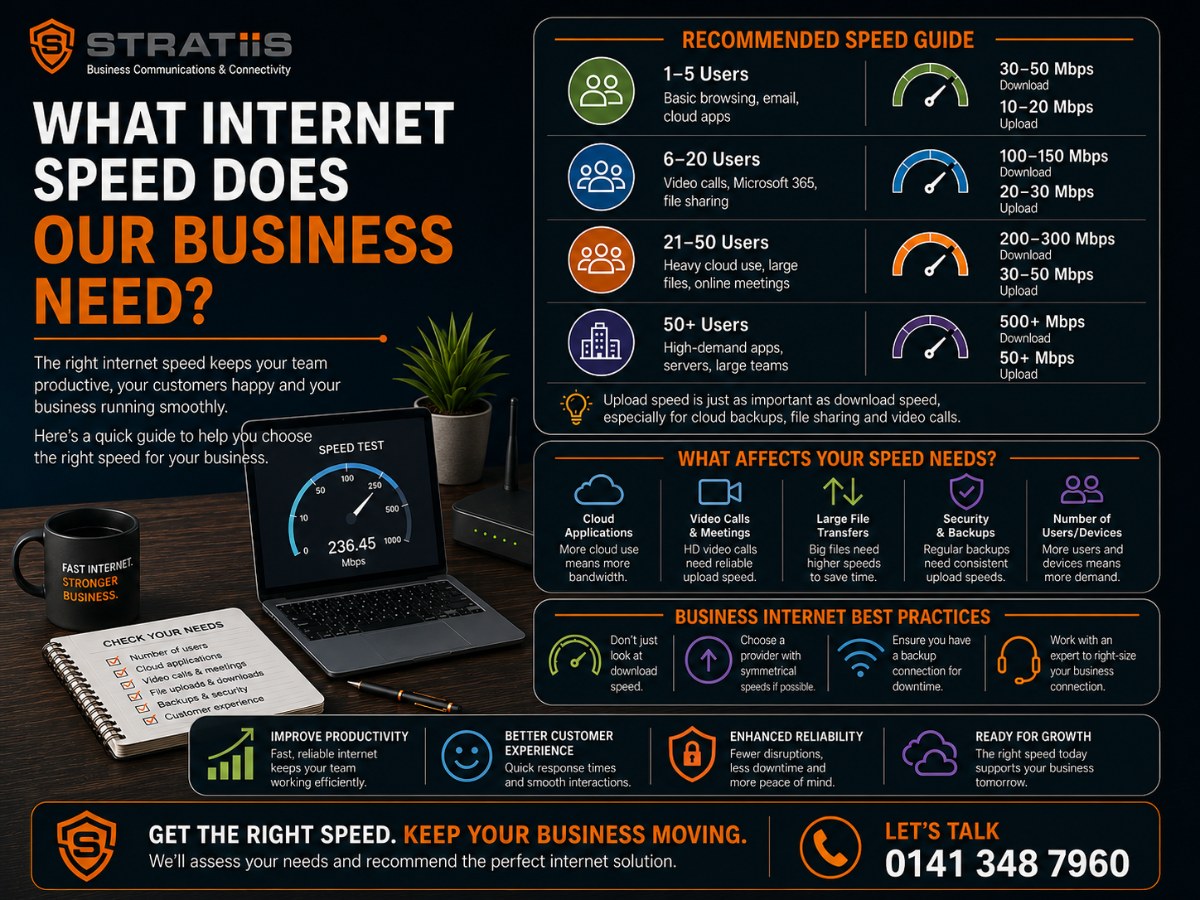
Most small businesses should consider an internet connection offering at least 100 Mbps download speed.
A business with 20 to 50 employees may need approximately 200 Mbps to 500 Mbps.
A larger, cloud-dependent or data-heavy organisation may need 500 Mbps, 1 Gbps or more.
However, employee numbers alone do not determine the correct internet speed.
The answer depends on what those employees do.
A 50-person contact centre making voice calls and using a cloud CRM may need less raw bandwidth than a 20-person design agency uploading large video files.
Your business should consider:
- Number of simultaneous users
- Microsoft Teams and video meetings
- Hosted Voice or Teams Phone
- Cloud applications
- File sizes
- Cloud backups
- CCTV uploads
- Guest Wi-Fi
- Multiple offices
- Home and remote workers
- Peak usage
- Upload speed
- Future growth
- The impact of an outage
For many organisations, the most important question is not:
What is the fastest connection we can buy?
It is:
What connection gives us enough capacity, stability and resilience to work properly during our busiest periods?
A very fast internet service can still provide a poor experience when the upload capacity is limited, the Wi-Fi is weak or the connection keeps dropping.
A quick business internet speed guide
The following figures provide a useful starting point.
They are not fixed rules.
1 to 10 employees
Consider approximately:
- 50 Mbps to 100 Mbps for basic cloud and email use
- 100 Mbps to 300 Mbps where video meetings and cloud services are common
10 to 25 employees
Consider approximately:
- 100 Mbps to 300 Mbps for general office use
- 300 Mbps to 500 Mbps for heavier cloud and video use
25 to 50 employees
Consider approximately:
- 200 Mbps to 500 Mbps for normal business use
- 500 Mbps to 1 Gbps for heavy cloud, video or file activity
50 to 100 employees
Consider approximately:
- 500 Mbps to 1 Gbps
- A leased line where performance and repair commitments are important
More than 100 employees
Consider approximately:
- 1 Gbps or more
- A properly sized leased line
- Backup connectivity
- Potentially more than one connection
These ranges assume that several employees will use the connection at the same time.
A detailed assessment should use measured business demand rather than headcount alone.
Why is there no simple speed-per-employee rule?
Different employees create very different internet demands.
One employee may use:
- Web browsing
- Cloud accounting
- A few Teams calls
Another may use:
- High-definition video meetings
- Large design files
- Cloud backups
- Remote desktop
- Online training
- Several cloud applications
A receptionist may handle frequent voice calls but use relatively little bandwidth.
A video editor may use more capacity than an entire small office.
The correct speed depends on:
- User activity
- Simultaneous use
- Upload and download demand
- Application sensitivity
- Peak periods
A simple calculation of 10 Mbps per employee can provide a rough planning figure.
It should not replace proper analysis.
Is download speed the most important number?
Not always.
Download speed affects how quickly employees receive information from the internet.
It may influence:
- Opening websites
- Downloading files
- Streaming training
- Receiving cloud data
- Software downloads
- Video quality
Upload speed affects how quickly employees send information.
It may influence:
- Video meetings
- Cloud backups
- Hosted Voice
- File uploads
- CCTV
- Screen sharing
- Remote access
- Sending large email attachments
Many broadband products advertise a high download speed while offering a much lower upload speed.
For example, a service may provide:
- 500 Mbps download
- 50 Mbps upload
That may be perfectly adequate for some businesses.
It may become restrictive when many employees upload data simultaneously.
How much upload speed does a business need?
A small office with light cloud use may work with 20 Mbps to 50 Mbps upload capacity.
A business with frequent video meetings, voice calls and cloud applications may need 50 Mbps to 200 Mbps or more.
An organisation with heavy backups, video production or data replication may need:
- 500 Mbps upload
- 1 Gbps upload
- A symmetrical leased line
Upload demand is often overlooked because employees notice slow downloads more easily.
However, limited upload capacity may cause:
- Broken voice calls
- Poor video meetings
- Slow backups
- Delayed file transfers
- High latency
- General network sluggishness
The provider should measure peak upload use, not only the average.
How much internet speed does email need?
Email uses relatively little bandwidth.
A business using only:
- Light web browsing
- Cloud documents
- Occasional small downloads
may not need a very high-speed service.
However, modern email use often includes:
- Large attachments
- Cloud links
- Document previews
- Security scanning
- Microsoft 365 synchronisation
- Mobile devices
Email rarely determines the required connection speed on its own.
It is the combined use of email, video, cloud applications and other services that matters.
How much speed does web browsing need?
Normal web browsing uses relatively little bandwidth per user.
A standard office may browse comfortably on a modest connection.
The demand increases when websites include:
- Video
- Interactive applications
- Large images
- Online training
- Cloud software
- Browser-based meetings
Web browsing may also feel slow when the real problem is:
- Poor Wi-Fi
- DNS delays
- Security inspection
- Old computers
- Browser extensions
- Network congestion
Buying faster internet does not fix every slow website.
How much speed does Microsoft 365 need?
Microsoft 365 itself does not require one fixed speed.
The demand depends on how the organisation uses:
- Outlook
- SharePoint
- OneDrive
- Teams
- Office applications
- Cloud storage
- Device updates
A small office using email and documents may work well on 100 Mbps.
A larger organisation constantly synchronising files, running Teams meetings and accessing SharePoint may need 500 Mbps or more.
OneDrive and SharePoint may create bursts of traffic when:
- New computers synchronise
- Large folders are shared
- Employees upload many files
- Devices return after being offline
- Teams files are opened by many users
Network design and synchronisation settings can matter as much as headline speed.
How much speed does Microsoft Teams need?
A Teams audio call uses relatively little bandwidth.
Video meetings use considerably more.
Demand increases with:
- High-definition video
- Gallery view
- Screen sharing
- Large meetings
- Several simultaneous meetings
- Teams Rooms
- Webinars
- Recorded sessions
A ten-person business with two simultaneous Teams meetings may work comfortably on 100 Mbps.
A 50-person office with many simultaneous meetings may benefit from 500 Mbps or 1 Gbps.
The connection also needs:
- Low packet loss
- Low latency
- Low jitter
- Stable upload performance
A high speed cannot compensate for an unstable service.
How much speed does Zoom or video conferencing need?
The exact bandwidth varies by platform, video quality and number of participants.
For practical planning, an individual high-quality video meeting may use a few megabits per second in each direction.
The important figure is the number of simultaneous meetings.
For example:
- Five simultaneous meetings may require modest capacity
- Twenty simultaneous meetings create much greater upload and download demand
- Meeting-room systems may use higher-quality video and audio
- Screen sharing and recording add traffic
The provider should estimate realistic simultaneous use rather than assuming every employee will be in a video meeting at once.
How much bandwidth does Hosted Voice need?
Hosted Voice calls use relatively little bandwidth compared with video.
A practical planning allowance is approximately 100 kilobits per second in each direction for every simultaneous call.
This means:
- 10 simultaneous calls may need around 1 Mbps each way
- 25 simultaneous calls may need around 2.5 Mbps each way
- 50 simultaneous calls may need around 5 Mbps each way
The required capacity is modest.
Call quality still depends on:
- Packet loss
- Latency
- Jitter
- Upload congestion
- Firewall
- Wi-Fi
- Network switches
A 1 Gbps service can still produce poor calls when the network is badly designed.
[Read: What Internet Connection Does Hosted Voice Need?]
How much speed does Teams Phone need?
Teams Phone voice calls do not normally need large amounts of bandwidth.
The wider Teams environment may create more demand through:
- Video meetings
- Screen sharing
- File collaboration
- Chat attachments
- Cloud recordings
A business should therefore assess Teams Phone as part of the complete Microsoft Teams workload.
For most offices, call quality will depend more on:
- Stability
- Packet loss
- Jitter
- Upload congestion
- Wi-Fi
- Firewall performance
than on buying the fastest available package.
How much speed does cloud accounting software need?
Cloud accounting platforms generally use modest bandwidth.
However, the business may also upload:
- Scanned documents
- Receipts
- Reports
- Payroll files
- Bank transactions
- Large attachments
A small accountancy practice may work well on 100 Mbps to 300 Mbps.
A larger firm may need more because employees also use:
- Microsoft 365
- Video meetings
- Document management
- Client portals
- Cloud backups
- Remote desktops
The accounting platform should not be considered in isolation.
How much speed does a cloud CRM need?
Most cloud CRM systems use modest bandwidth for normal records and searches.
Demand may increase through:
- Customer file attachments
- Call recording
- Screen pops
- Integrated telephony
- Marketing automation
- Reporting
- Video
- Large data imports
- Contact-centre activity
The CRM may become unusable during an outage even when it does not use much bandwidth.
This is why reliability and backup may matter more than raw speed.
How much speed does cloud backup need?
Cloud backup can use large amounts of upload capacity.
The demand depends on:
- Volume of data
- Frequency of changes
- Backup window
- Number of devices
- Initial upload
- Retention
- Rate limits
The first backup may be particularly heavy.
A business with slow upload capacity may find that backups:
- Run all day
- Affect calls
- Disrupt video meetings
- Never complete
- Continue into working hours
Possible solutions include:
- Scheduling backups overnight
- Limiting backup bandwidth
- Increasing upload speed
- Using a leased line
- Seeding the first backup another way
How much speed does cloud storage need?
Cloud storage demand depends on file size and user behaviour.
A business working mainly with:
- Word documents
- Spreadsheets
- PDFs
may have modest requirements.
A company working with:
- CAD drawings
- High-resolution images
- Video
- Large databases
- Design files
may need significantly more capacity.
Upload speed is particularly important when employees regularly send large files to the cloud.
How much speed does remote desktop need?
Remote desktop services do not always use large amounts of bandwidth.
They are sensitive to:
- Latency
- Packet loss
- Stability
- Screen resolution
- Video within the session
- Number of users
A remote desktop can feel slow on a fast connection when latency is high.
A leased line may improve consistency.
Moving systems closer to users or into an appropriate cloud region may also help.
How much speed does CCTV need?
CCTV can create significant upload demand when footage is:
- Stored in the cloud
- Viewed remotely
- Continuously transmitted
- Recorded at high resolution
The demand depends on:
- Number of cameras
- Resolution
- Frame rate
- Compression
- Motion detection
- Recording method
A few cameras may have little impact.
Dozens of high-resolution cameras may use substantial continuous upload capacity.
CCTV should be included in the internet assessment rather than treated as a separate building service.
How much speed does guest Wi-Fi need?
Guest Wi-Fi can use a large and unpredictable amount of bandwidth.
Visitors may:
- Stream video
- Download updates
- Join video meetings
- Back up photographs
- Use cloud applications
The business should consider:
- Separate guest network
- Bandwidth limits
- Time restrictions
- Content filtering
- User authentication
- Priority for business traffic
Guest Wi-Fi should not be allowed to affect voice calls or critical cloud applications.
How much speed does a five-person business need?
A five-person business may need approximately:
- 50 Mbps to 100 Mbps for basic use
- 100 Mbps to 300 Mbps for cloud and video-heavy use
A reliable Full Fibre business broadband connection may be sufficient.
The business should also consider:
- Upload speed
- Support
- 4G or 5G backup
- Router quality
- Wi-Fi
A five-person business does not usually need a leased line purely because it uses Microsoft 365.
It may need one when the cost of downtime is unusually high.
How much speed does a ten-person business need?
A ten-person business may consider:
- 100 Mbps for basic cloud use
- 200 Mbps to 300 Mbps for frequent meetings and larger files
- 500 Mbps where activity is data heavy
Full Fibre broadband may offer more than enough headline capacity.
The organisation should not overlook upload speed and repair commitments.
How much speed does a 20-person business need?
A 20-person business may consider:
- 100 Mbps to 300 Mbps for normal office use
- 300 Mbps to 500 Mbps for heavier cloud and video use
- 500 Mbps or more for large file activity
A high-quality broadband service with tested failover may be appropriate.
A leased line may be justified when:
- The whole team depends on cloud systems
- Customer calls are internet based
- Upload is critical
- Downtime is expensive
How much speed does a 50-person business need?
A 50-person organisation may consider:
- 200 Mbps to 500 Mbps for standard use
- 500 Mbps to 1 Gbps for heavy cloud use
- A leased line for stronger performance and repair commitments
The organisation should measure:
- Simultaneous meetings
- Upload demand
- Call volumes
- Cloud backups
- Peak usage
- Guest traffic
- Future growth
Fifty users do not automatically require 1 Gbps.
They may benefit from it when the cost difference is modest or growth is expected.
How much speed does a 100-person business need?
A 100-person business may consider:
- 500 Mbps as an initial minimum for many cloud-based offices
- 1 Gbps where activity is heavy
- More capacity for data-intensive work
- A leased line with a backup service
The organisation should also assess:
- Firewall capacity
- Network switches
- Wi-Fi density
- Building cabling
- Resilience
- Monitoring
A 1 Gbps connection cannot perform properly through an old firewall limited to 300 Mbps.
How much speed does a contact centre need?
A contact centre may not use enormous bandwidth per voice call.
It depends heavily on internet availability.
The connection may support:
- Voice
- CRM
- Call recording
- Reporting
- Supervisor dashboards
- Web chat
- Screen sharing
- Remote agents
The contact centre may require:
- 500 Mbps or 1 Gbps
- Symmetrical upload and download
- A leased line
- Second fixed connection
- Automatic failover
- Power protection
The exact speed depends on agent numbers and applications.
Resilience is often more important than purchasing excessive bandwidth.
How much speed does a design or media business need?
A design, architecture or media company may need:
- 500 Mbps
- 1 Gbps
- More than 1 Gbps
- Symmetrical upload and download
The main drivers may include:
- Video
- CAD
- Large images
- Render files
- Client transfers
- Cloud storage
- Remote collaboration
A 20-person design company may need more capacity than a 100-person call-based office.
How much speed does an accountancy firm need?
An accountancy firm may consider:
- 100 Mbps to 300 Mbps for a small practice
- 300 Mbps to 500 Mbps for a growing firm
- 500 Mbps to 1 Gbps for a larger multi-service office
The firm may rely on:
- Microsoft 365
- Cloud accounting
- Document management
- Client portals
- Video meetings
- Hosted Voice
- Backups
Performance during filing, payroll and tax deadlines may matter more than average monthly usage.
How much speed does a housing association need?
A housing association may require:
- 200 Mbps to 500 Mbps for a smaller office
- 500 Mbps to 1 Gbps for a larger head office
- A leased line for tenant-facing or cloud-dependent operations
- Backup connectivity
Demand may come from:
- Repairs contact centre
- Housing-management system
- Microsoft Teams
- Hosted Voice
- Remote officers
- CCTV
- Several offices
- Cloud document management
Tenant services may make connectivity business critical even when raw bandwidth use is moderate.
How much speed does a charity need?
A charity may need anything from 100 Mbps to 1 Gbps depending on:
- Employee numbers
- Volunteers
- Public access
- Video meetings
- Helplines
- Training
- Cloud systems
- Several sites
A lower-cost Full Fibre connection with mobile failover may provide good value.
A charity running a critical helpline may need a leased line and stronger resilience.
Budget constraints should not lead to ignoring the cost of service disruption.
Do home workers affect the office connection?
It depends on the network design.
Home workers may connect directly to cloud services such as:
- Microsoft 365
- Teams
- Cloud CRM
- Hosted Voice
This traffic does not necessarily pass through the office.
It may pass through the office when employees use:
- VPN
- Remote desktop
- Office-based servers
- Central security gateway
- File shares
Routing every remote worker through the office can increase bandwidth and create a single point of failure.
The wider cloud and security design should be reviewed.
How should we allow for simultaneous use?
Not every employee uses maximum bandwidth at the same time.
Capacity planning should estimate realistic peak activity.
For example, during the busiest hour the organisation may have:
- 20 video meetings
- 25 voice calls
- 10 large file uploads
- A cloud backup
- 50 active cloud-software users
- Guest Wi-Fi activity
The provider should plan for that peak rather than adding the maximum possible demand of every application.
A sensible allowance should also remain for unexpected bursts.
How much spare capacity should we keep?
A connection should not run close to full capacity throughout the working day.
Regularly using more than approximately 70% to 80% of available capacity during peak periods may leave too little room for bursts.
This may lead to:
- Slow applications
- Broken calls
- Poor meetings
- Delayed uploads
- User complaints
The organisation may need:
- More bandwidth
- Traffic management
- Backup scheduling
- Quality of Service
- Guest restrictions
- Application changes
The exact threshold depends on the service and traffic pattern.
Should we buy extra capacity for growth?
Yes, within reason.
Consider:
- Employee growth
- More cloud services
- Office attendance
- More video
- New contact centre
- Larger files
- Business acquisition
- New site connectivity
- Contract length
A 36-month contract should support more than today’s exact requirement.
However, buying several times the expected capacity may waste money.
Ask whether the service can be upgraded quickly.
What is a bearer on a leased line?
The bearer is the maximum physical capacity installed.
For example:
- 100 Mbps service on a 1 Gbps bearer
- 500 Mbps service on a 1 Gbps bearer
- 1 Gbps service on a 10 Gbps bearer
A higher bearer may allow faster upgrades without installing a new fibre circuit.
Ask:
- What bearer will be installed?
- What bandwidth will be active?
- How much will upgrades cost?
- Will upgrading restart the contract?
Is 1 Gbps too much for a small business?
It may be more than the business needs.
However, Full Fibre providers may offer 1 Gbps at a relatively modest premium over slower packages.
The business may choose it for:
- Faster large downloads
- Future growth
- Simple product choice
- Improved upload, depending on the package
The organisation should still confirm:
- Actual upload speed
- Router capability
- Firewall capability
- Wi-Fi performance
- Support
- Repair targets
A gigabit service through unsuitable equipment will not deliver gigabit performance.
Is 100 Mbps enough for a business?
It may be enough for a small or lightly used office.
It may become restrictive when the organisation has:
- Frequent video meetings
- Large cloud backups
- Many simultaneous users
- Large file transfers
- Cloud-hosted systems
- High upload demand
A 100 Mbps symmetrical leased line may feel more consistent than a faster broadband connection with low upload and variable performance.
Speed should be assessed alongside service quality.
Is 500 Mbps enough for a business?
For many small and medium-sized organisations, yes.
500 Mbps may support:
- Dozens of cloud users
- Teams meetings
- Hosted Voice
- Microsoft 365
- Cloud applications
- Moderate file transfers
The answer depends on upload capacity and simultaneous activity.
A 500 Mbps connection with 50 Mbps upload is different from a symmetrical 500 Mbps leased line.
Do we need a leased line?
Not necessarily.
Business broadband may be sufficient when:
- Full Fibre is available
- Upload is adequate
- The service has been reliable
- Employee numbers are modest
- A backup connection exists
- Downtime is manageable
A leased line should be considered when:
- Internet failure stops operations
- Upload is critical
- Performance varies
- Repairs take too long
- Customer calls depend on the connection
- Many employees use cloud services
- The business needs committed bandwidth
[Read: Business Broadband vs Leased Line]
Is a faster connection better than a backup connection?
Not always.
A 1 Gbps connection can still fail completely.
Two connections may provide better business continuity than one very fast circuit.
For example:
- 500 Mbps primary connection
- 100 Mbps backup connection
may provide greater operational resilience than:
- One 1 Gbps connection
- No backup
The correct balance depends on:
- Application demand
- Outage risk
- Budget
- Business impact
What type of backup internet should we have?
Options include:
- 4G
- 5G
- Second business broadband connection
- Second leased line
- Fixed wireless
- Satellite
A small office may use mobile failover.
A contact centre may need a second fixed connection using another carrier and route.
The backup may provide lower speed than the primary service.
It should be able to support essential systems.
[Explore Internet Failover]
Does the firewall affect internet speed?
Yes.
A firewall may limit performance when:
- It is undersized
- Security inspection is enabled
- Too many users connect
- VPN encryption is heavy
- Firmware is outdated
- Its licence is limited
- It is overloaded
A business may purchase 1 Gbps internet while its firewall can process only 300 Mbps with security features enabled.
The provider should assess real firewall throughput rather than relying on the largest number on the manufacturer’s product sheet.
Does Wi-Fi affect internet speed?
Yes.
The internet connection may reach the building at full speed while employees experience slow Wi-Fi.
Possible causes include:
- Poor coverage
- Old access points
- Interference
- Too many users
- Weak signal
- Incorrect placement
- Thick walls
- Channel congestion
- Slow client devices
A faster internet circuit cannot fix poor wireless design.
[Explore Managed Business Wi-Fi]
Does cabling affect speed?
Yes.
Old or damaged cabling may limit:
- Network speed
- Stability
- Power over Ethernet
- Device connectivity
Problems may include:
- Poor terminations
- Damaged connectors
- Outdated cable
- Incorrect patching
- Long or unsuitable cable runs
The internal network should be capable of carrying the internet speed to employees.
[Explore Structured Cabling]
Why does our internet feel slow when speed tests look good?
Possible causes include:
- Poor Wi-Fi
- High latency
- Packet loss
- DNS problems
- Firewall limitations
- Old computers
- Cloud-application issues
- VPN routing
- Upload saturation
- Provider congestion
- Browser problems
- Network loops
A speed test measures only part of the user experience.
It may also select a nearby test server that does not reflect the route to the business application.
The provider should investigate the complete connection path.
When should we upgrade our internet speed?
Consider an upgrade when:
- Peak use regularly approaches available capacity
- Employees report slow cloud applications
- Video meetings break up
- Voice calls deteriorate during busy periods
- Backups affect daytime work
- Large file transfers take too long
- Employee numbers have increased
- New cloud systems are being introduced
- The current speed no longer supports growth
Upgrading should follow measurement where possible.
When will a speed upgrade not fix the problem?
More bandwidth may not fix:
- Internet dropouts
- Weak Wi-Fi
- Packet loss
- High latency
- Poor firewall performance
- Faulty cabling
- Slow applications
- Old devices
- DNS issues
- Server problems
A 1 Gbps upgrade may deliver no noticeable improvement when employees are connected through poor Wi-Fi.
The underlying cause should be identified first.
How should we measure current internet use?
The organisation may review:
- Router statistics
- Firewall monitoring
- Internet-provider portal
- Network-management platform
- Application analytics
- Peak upload
- Peak download
- Traffic by application
- Usage by site
- Packet loss
- Latency
- Jitter
Monitoring should cover realistic periods, including:
- Busy mornings
- Backup windows
- Month-end
- Payroll
- Customer campaigns
- Office-wide meetings
One quiet afternoon does not provide enough information.
How long should we monitor before choosing a speed?
For a normal office, one or two weeks may provide useful evidence.
Longer monitoring may be needed when demand changes during:
- Month-end
- Tax deadlines
- Payroll
- Seasonal activity
- Campaigns
- Events
- Board meetings
The provider should also consider future changes that monitoring cannot show.
Should we use average or peak bandwidth?
Peak bandwidth is more important for sizing.
An average may hide periods when the connection reaches full capacity.
For example:
- Average use may be 100 Mbps
- Peak use may reach 480 Mbps
- The business may have a 500 Mbps connection
Employees experience the peak-period congestion, not the monthly average.
The pattern and duration of the peaks also matter.
A short burst may be harmless.
Sustained high use may require an upgrade.
Should different applications receive priority?
Possibly.
Quality of Service may prioritise traffic such as:
- Hosted Voice
- Teams Phone
- Video meetings
- Critical business systems
over less time-sensitive traffic such as:
- Software downloads
- Cloud backup
- Guest browsing
Quality of Service can help within networks the organisation controls.
It cannot always guarantee priority across the public internet.
Incorrect configuration may make performance worse.
Common mistakes when choosing business internet speed
Buying based only on employee numbers
User activity varies greatly.
Looking only at download speed
Upload is critical for modern cloud working.
Ignoring peak use
Average demand may appear comfortable while busy periods struggle.
Buying the fastest service without checking the network
The firewall, switches or Wi-Fi may become bottlenecks.
Assuming faster means more reliable
Speed and resilience are different.
Having no backup connection
Every primary service can fail.
Ignoring cloud backups and CCTV
Background uploads may consume capacity.
Not allowing for growth
A long contract may outlast the current requirement.
Choosing a leased line only because it sounds better
Full Fibre broadband may be sufficient.
Keeping broadband only because it is cheaper
Downtime may cost more than the monthly saving.
Questions to ask an internet provider
- How did you calculate the recommended speed?
- What is the download speed?
- What is the upload speed?
- Is the speed committed or “up to”?
- Is the service contended?
- What are our current peak levels?
- How much spare capacity will remain?
- Can the speed be upgraded?
- How quickly can it be upgraded?
- Will an upgrade restart the contract?
- Is the router capable of the full speed?
- Is the firewall capable of the full speed?
- Is our Wi-Fi suitable?
- Do we need new switches or cabling?
- What repair target applies?
- Is support available out of hours?
- What backup connection is recommended?
- Does the backup use another carrier?
- What happens during a power cut?
- What is the full three-year cost?
Warning signs to watch for
Be cautious when a provider:
- Recommends a speed using headcount alone
- Does not ask about upload requirements
- Ignores video meetings and backups
- Does not review the firewall
- Does not assess Wi-Fi
- Promises that a faster circuit will fix every problem
- Recommends 1 Gbps without reviewing use
- Says 100 Mbps is enough without understanding applications
- Does not discuss backup
- Cannot explain the repair target
- Quotes only the headline monthly price
- Does not allow for growth
- Does not measure peak demand
What internet speed does your business really need?
For initial planning:
- A small business may need 100 Mbps to 300 Mbps
- A 20- to 50-person business may need 200 Mbps to 500 Mbps
- A larger cloud-dependent organisation may need 500 Mbps to 1 Gbps
- A data-heavy or very large business may need 1 Gbps or more
These figures are useful starting points.
They are not a substitute for understanding:
- Simultaneous use
- Upload demand
- Cloud applications
- File sizes
- Video meetings
- Voice calls
- Backups
- Business continuity
- Growth
The correct service may be:
- Full Fibre business broadband
- Two broadband connections
- A leased line
- A leased line with broadband backup
- A higher-speed service with mobile failover
The best answer is not the largest number available.
It is a connection that performs reliably at your busiest time and has an appropriate backup when it fails.
Measure demand before buying more bandwidth
Internet speed affects nearly every part of a modern organisation.
However, slow performance does not always mean the business needs a faster circuit.
The real issue may be:
- Upload capacity
- Wi-Fi
- Firewall
- Cabling
- Backups
- Application design
- Lack of failover
Stratiis can review your current internet service, network usage, Microsoft 365, Teams, Hosted Voice, cloud applications, firewall, Wi-Fi and future growth.
We can then help you decide:
- How much download capacity is required
- How much upload capacity is required
- Whether Full Fibre is enough
- Whether a leased line is justified
- Which backup service is appropriate
- Whether the internal network needs improvement
Book a Business Internet Capacity Review
Call: 0141 348 7960
Email: sales@stratiis.com


