
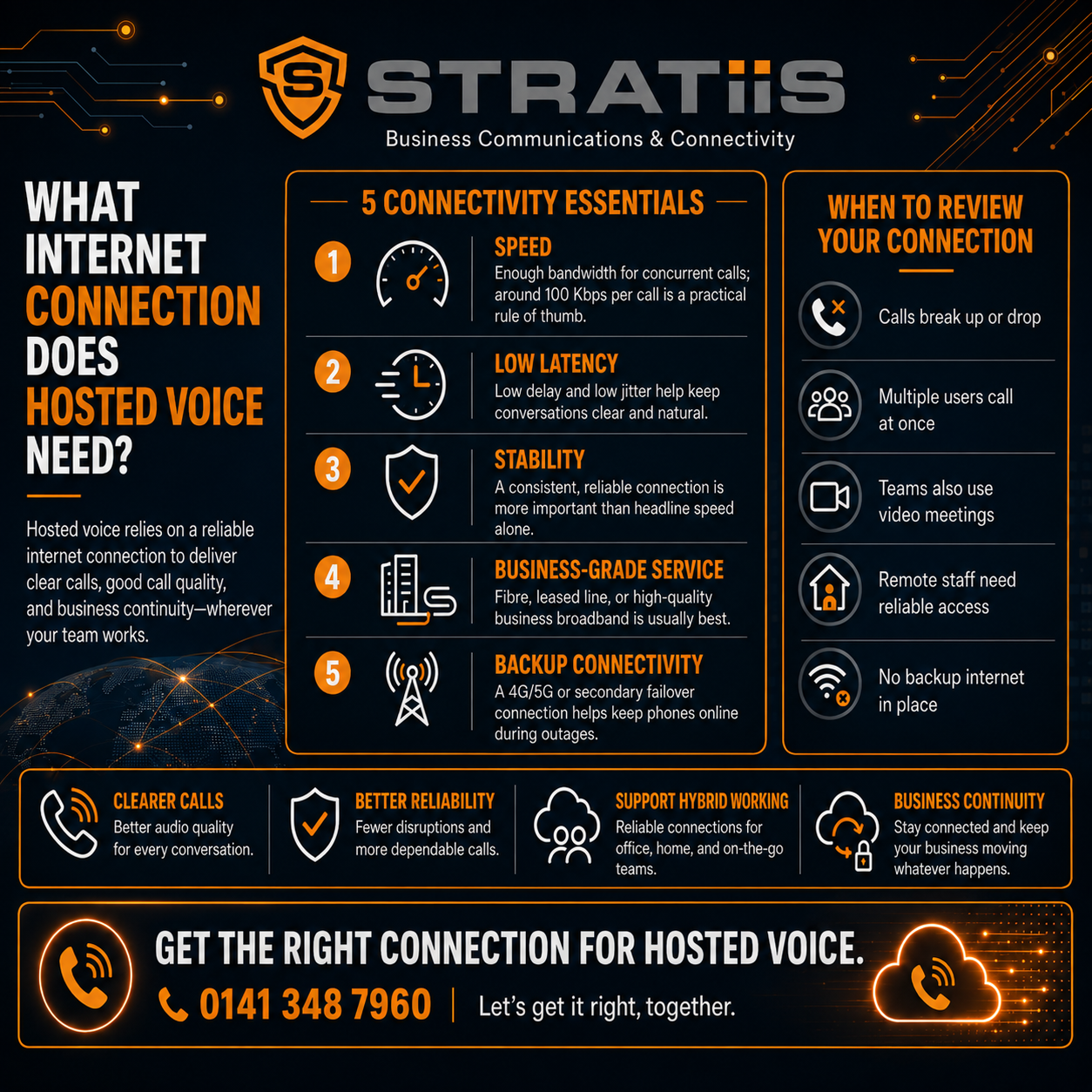
Hosted Voice does not normally need a huge amount of internet bandwidth.
A single business voice call may use only a small amount of data compared with video meetings, cloud backups or large file transfers.
However, Hosted Voice needs something more important than raw speed:
It needs a stable, well-managed internet connection with low delay, low packet loss and consistent performance.
For a small business, a reliable Full Fibre broadband connection may be perfectly suitable.
A larger organisation, contact centre or business that depends heavily on telephone calls may need:
- A leased line
- A second internet connection
- Automatic 4G or 5G failover
- Business-grade routers and firewalls
- Managed network switches
- Properly designed Wi-Fi
- Quality of Service controls
- Power backup
The right connection depends on:
- Number of employees
- Number of simultaneous calls
- Video-meeting use
- Other cloud applications
- Office locations
- Home workers
- Customer-call volumes
- Impact of an outage
The biggest mistake is assuming that a high download speed automatically means the connection is ready for Hosted Voice.
It does not.
In this article, we will explain what Hosted Voice needs, how much bandwidth to allow and how to reduce the risk of poor call quality.
What is Hosted Voice?
Hosted Voice is a cloud-based business telephone system.
It may also be described as:
- Cloud telephony
- Hosted VoIP
- Cloud PBX
- Business VoIP
- IP telephony
Instead of relying on a traditional telephone system installed at your premises, employees connect to a cloud phone platform through the internet.
They may make and receive calls using:
- IP desk phones
- Desktop applications
- Headsets
- Mobile applications
- Tablets
The service may provide:
- Business telephone numbers
- Call transfers
- Voicemail
- Call forwarding
- Auto-attendants
- Call queues
- Hunt groups
- Call recording
- Call reporting
- Mobile working
- Multi-site calling
Because the service is cloud-based, the quality of your internet and local network directly affects the calling experience.
Does Hosted Voice require a special internet connection?
Not always.
Hosted Voice can operate over several types of business internet connection, including:
- Full Fibre broadband
- Fibre to the Cabinet broadband
- Leased lines
- Fixed wireless
- 4G or 5G
- Managed wide-area networks
The right option depends on the size and needs of the organisation.
A ten-person office with light call usage may work well on reliable business Full Fibre broadband.
A 100-person organisation handling large numbers of customer calls may need a leased line with stronger service levels and backup connectivity.
The connection does not need to be marketed specifically as a “voice line.”
It needs to provide the required quality, stability and resilience.
How much bandwidth does one Hosted Voice call use?
A typical Hosted Voice call may use roughly 80 to 100 kilobits per second in each direction, depending on the voice codec, platform and network overhead.
For budgeting, allowing around 100 kilobits per second of upload and download capacity for each active call is a useful starting point.
For example:
- 5 simultaneous calls may require around 0.5 Mbps each way
- 10 simultaneous calls may require around 1 Mbps each way
- 25 simultaneous calls may require around 2.5 Mbps each way
- 50 simultaneous calls may require around 5 Mbps each way
These figures are modest compared with modern internet speeds.
But bandwidth alone does not determine call quality.
A connection can have hundreds of megabits of available speed and still produce poor calls if it experiences:
- Packet loss
- Delay
- Jitter
- Congestion
- Wi-Fi interference
- Firewall problems
Do we calculate bandwidth by employees or simultaneous calls?
Use the likely number of simultaneous calls.
A 50-person business will not necessarily have 50 people on the phone at the same time.
You should review:
- Number of employees
- Departments
- Call volumes
- Busy periods
- Reception
- Sales activity
- Customer-service teams
- Conference calls
- Hybrid users
For example, a 50-person professional-services firm may have only ten or fifteen simultaneous calls during a busy period.
A 50-person contact centre may have most employees on calls at once.
The contact centre requires much more careful capacity and resilience planning.
Is download speed or upload speed more important?
Both matter.
Voice communication is two-way.
Your connection must:
- Download the other person’s voice
- Upload your employee’s voice
Some broadband services advertise high download speeds but provide much lower upload capacity.
That may become a problem when the organisation also uses:
- Video meetings
- Cloud backups
- Large file uploads
- CCTV
- Remote desktop
- Microsoft Teams
- Cloud storage
Hosted Voice itself may not consume much upload bandwidth.
The combined demand from all services can create congestion.
What is packet loss?
Internet traffic is divided into small units called packets.
Packet loss occurs when some of those packets do not reach their destination.
During a file download, missing information can often be sent again.
Live voice cannot always wait for repeated delivery.
Packet loss may cause:
- Missing words
- Choppy audio
- Robotic speech
- One-way conversation
- Dropped calls
For business voice, packet loss should be kept very low.
Even small amounts can become noticeable.
Repeated or fluctuating packet loss is usually more damaging than a slightly lower headline internet speed.
What is latency?
Latency is the time it takes for information to travel between two points.
In a telephone conversation, high latency creates delay.
People may:
- Talk over one another
- Pause unnecessarily
- Think the call has disconnected
- Find the conversation unnatural
Some delay is unavoidable.
Problems become more noticeable when traffic travels:
- Through several networks
- Through badly configured VPNs
- Over satellite connections
- Through congested internet services
- Across distant international routes
The Hosted Voice provider should assess the full route to its platform.
What is jitter?
Jitter is variation in the arrival time of network packets.
Voice traffic should arrive at a steady, predictable rate.
When packets arrive irregularly, the phone or application must try to rebuild the conversation.
High jitter can cause:
- Broken audio
- Distorted speech
- Short gaps
- Delayed sound
- Call instability
Jitter may be caused by:
- Network congestion
- Poor Wi-Fi
- Overloaded routers
- Internet-provider issues
- Competing applications
- Inadequate network design
A speed test may not reveal all jitter problems.
Why can a fast connection still produce poor calls?
A fast internet service can still suffer from:
- Packet loss
- Jitter
- Delay
- Router limitations
- Firewall problems
- Wi-Fi congestion
- Poor cabling
- Network loops
- Upload saturation
- Provider routing problems
For example, a business may have a 500 Mbps connection.
If cloud backups consume most of the upload capacity or employees use weak Wi-Fi, calls may still sound poor.
The correct question is not only:
How fast is the internet?
It is:
How well does the complete network carry real-time voice traffic?
Is Full Fibre broadband suitable for Hosted Voice?
Often, yes.
Full Fibre broadband can provide:
- High download speeds
- Better upload speeds
- Improved stability
- Lower latency
- Greater capacity than older broadband
It may be suitable for:
- Small businesses
- Medium offices
- Hybrid-working organisations
- Businesses with moderate call volumes
- Offices using cloud applications
The decision should also consider:
- Repair targets
- Service-level agreements
- Available backup
- Business impact of downtime
- Router and firewall quality
- Wi-Fi
- Local availability
Consumer-style Full Fibre may provide excellent performance but limited repair commitments.
A business that depends heavily on customer calls may need stronger service and resilience.
Is Fibre to the Cabinet suitable?
It may be for smaller or light-use businesses.
Fibre to the Cabinet services use fibre for part of the route and copper for the final connection.
Performance can vary based on:
- Distance from the cabinet
- Copper-line quality
- Local congestion
- Upload capacity
- Weather or line faults
The service may support a small number of Hosted Voice users.
It may be less suitable when the organisation has:
- Many simultaneous calls
- Frequent video meetings
- Heavy cloud use
- High upload requirements
- Low tolerance for downtime
A readiness assessment is more reliable than judging the service by product name alone.
Is a leased line required?
Not every business needs a leased line.
A leased line may be appropriate when the organisation:
- Depends heavily on customer calls
- Has many simultaneous users
- Uses cloud applications throughout the day
- Needs symmetrical upload and download speeds
- Requires stronger service commitments
- Runs a contact centre
- Cannot tolerate prolonged outages
- Needs consistent performance
A leased line typically provides dedicated business connectivity with equal upload and download capacity.
It may also provide better repair targets than standard broadband.
It costs more.
The additional cost should be compared with the impact of losing internet, phones and cloud services.
Can Hosted Voice work over 4G or 5G?
Yes.
Hosted Voice can operate over a stable 4G or 5G connection.
Mobile connectivity may be used for:
- Internet failover
- Temporary offices
- Construction sites
- Remote locations
- Home workers
- Mobile teams
- Emergency continuity
Performance depends on:
- Signal strength
- Network coverage
- Local congestion
- Building materials
- Router quality
- External antennas
- Data allowance
A strong mobile signal does not guarantee consistent performance during busy periods.
4G or 5G may be suitable as a primary connection in some situations.
It is more commonly used as a backup for a fixed connection.
Can Hosted Voice work over satellite internet?
It can, but the experience depends on the service.
Satellite connectivity may have:
- Higher latency
- Variable performance
- Weather sensitivity
- Data policies
- Obstructions
- Network-management limitations
Modern low-earth-orbit services may provide a better real-time experience than older satellite connections.
Satellite may be useful where fixed and mobile services are unavailable.
It should be tested carefully before being relied on for business-critical voice.
Does Hosted Voice work over Wi-Fi?
Yes, but Wi-Fi needs to be designed properly.
Employees may use Wi-Fi through:
- Laptops
- Smartphones
- Wireless desk phones
- Tablets
- Headsets connected to mobile devices
Wi-Fi problems may cause:
- Dropped calls
- Broken audio
- Delays
- Reconnection
- Poor movement between rooms
- Inconsistent meeting quality
A good Wi-Fi design should consider:
- Coverage
- Capacity
- Access-point placement
- Interference
- User density
- Building materials
- Roaming
- Channel use
- Network segmentation
Wi-Fi that is good enough for email may not be good enough for real-time voice.
Is wired networking better than Wi-Fi for desk phones?
Usually.
A wired Ethernet connection normally provides:
- More consistent performance
- Lower interference
- Stable power through Power over Ethernet
- Predictable network routing
- Easier troubleshooting
Desk phones are often connected directly to managed network switches.
Wi-Fi may still be appropriate for:
- Mobile workers
- Flexible desks
- Temporary spaces
- Smartphones
- Laptops
Critical reception and customer-service phones may benefit from wired connections.
What is Quality of Service?
Quality of Service, commonly shortened to QoS, is a network configuration used to prioritise important traffic.
It may help ensure voice traffic is handled ahead of less time-sensitive activity such as:
- Large downloads
- Software updates
- Cloud backups
- General web traffic
QoS may be configured on:
- Routers
- Firewalls
- Network switches
- Wide-area networks
It can help within networks the organisation controls.
It cannot always guarantee priority across the public internet.
QoS should be designed carefully.
Incorrect configuration can make performance worse.
Do small businesses need Quality of Service?
Not always.
A small business with:
- Plenty of available capacity
- Few simultaneous calls
- Reliable Full Fibre
- Limited heavy traffic
may experience excellent call quality without complex QoS.
QoS becomes more useful when:
- Capacity is limited
- The connection is heavily used
- Many voice users share the network
- Large uploads occur
- Several sites are connected
- A contact centre is involved
The provider should recommend it based on evidence rather than applying it automatically.
Does the router matter?
Yes.
The router is a critical part of the Hosted Voice service.
A poor or overloaded router may cause:
- Call drops
- One-way audio
- Registration problems
- Slow failover
- Congestion
- Unstable performance
The router should be appropriate for:
- Internet speed
- Number of users
- Number of connections
- Failover
- Security
- Voice traffic
- Monitoring
- Business support requirements
A low-cost consumer router may work for a very small office.
It may be unsuitable for a larger or business-critical environment.
Does the firewall matter?
Yes.
A firewall protects the network and controls internet traffic.
It also needs to allow the Hosted Voice service to operate correctly.
Problems may occur when:
- Security inspection overloads the firewall
- Required traffic is blocked
- Session limits are reached
- Old firmware is used
- SIP-related settings interfere with calls
- Multiple internet links are configured poorly
- VPN routing adds unnecessary delay
The provider should assess the firewall before migration.
A phone-system provider that ignores the firewall may struggle to resolve quality problems later.
What is SIP ALG?
SIP ALG is a router or firewall function designed to assist voice traffic.
In some environments, it may interfere with cloud calling.
Possible symptoms include:
- One-way audio
- Failed calls
- Phones not registering
- Calls dropping after a set time
- Incorrect addressing
Whether SIP ALG should be enabled or disabled depends on the platform and network design.
The Hosted Voice provider should provide clear technical requirements.
Changes should not be made blindly.
Do network switches matter?
Yes, particularly when IP desk phones are used.
Network switches may need to provide:
- Enough Ethernet ports
- Power over Ethernet
- Suitable performance
- Network segmentation
- Voice VLANs
- Monitoring
- Supported firmware
Old or unmanaged switches may create:
- Power limitations
- Congestion
- Troubleshooting difficulties
- Security concerns
- Inconsistent performance
The switch estate should be reviewed before a large Hosted Voice deployment.
What is a voice VLAN?
A VLAN separates network traffic logically.
A voice VLAN may keep IP phone traffic separate from general business devices.
Possible benefits include:
- Easier management
- Better security
- More consistent Quality of Service
- Simpler troubleshooting
- Clearer device policies
A voice VLAN is not essential for every small office.
It may be useful where many desk phones and managed switches are involved.
Does cabling affect Hosted Voice?
Yes.
Poor cabling can cause:
- Intermittent connections
- Packet loss
- Reduced speed
- Phone restarts
- Power problems
- Difficult troubleshooting
Cabling should be:
- Suitable for the required network speed
- Properly terminated
- Tested
- Labelled
- Connected through managed cabinets and patch panels
A cloud phone platform cannot correct a damaged physical cable.
[Explore Structured Cabling]
How do video meetings affect Hosted Voice?
Video meetings use more bandwidth than ordinary voice calls.
If employees use:
- Microsoft Teams
- Zoom
- Webex
- Other video platforms
the network needs to support voice and video at the same time.
The organisation should consider:
- Number of simultaneous meetings
- Camera quality
- Screen sharing
- Meeting-room systems
- Upload capacity
- Home workers
- Guest Wi-Fi
- Other cloud use
Voice may use only a small amount of bandwidth.
Several high-definition video meetings can use much more and may create congestion.
How do cloud backups affect calls?
Cloud backups can use large amounts of upload bandwidth.
When the upload connection becomes saturated, Hosted Voice may experience:
- Broken audio
- Delay
- Packet loss
- Dropped calls
Backups and large file transfers may need:
- Scheduling outside busy hours
- Bandwidth limits
- Quality of Service
- Better upload capacity
- Separate network planning
This issue is particularly common on broadband services with much lower upload than download speed.
How does CCTV affect Hosted Voice?
Cloud-connected CCTV may use continuous upload bandwidth.
The impact depends on:
- Number of cameras
- Resolution
- Frame rate
- Cloud recording
- Motion detection
- Remote viewing
CCTV demand should be included in the internet-capacity review.
Voice may be blamed for poor quality when the real cause is constant background upload traffic.
Do home workers need business broadband?
Not always.
Many employees can use Hosted Voice successfully over normal home broadband.
The quality depends on:
- Wi-Fi
- Upload capacity
- Other household use
- Router
- Distance from the access point
- Internet-provider performance
- Headset
- Device
Home-working issues may occur when:
- Children stream video
- Gaming uses the connection
- Cloud backups run
- The employee works far from the router
- Wi-Fi coverage is poor
- The connection is unstable
The business may provide:
- Connectivity guidance
- Approved headsets
- Ethernet adapters
- Mobile backup
- Business broadband contribution
- Office alternatives
- Support
Should home workers use Ethernet?
Where practical, a wired connection may improve reliability.
Ethernet can reduce problems caused by:
- Weak signal
- Interference
- Distance
- Wi-Fi congestion
- Movement
It may be particularly useful for employees who:
- Handle many customer calls
- Work in customer service
- Attend frequent video meetings
- Experience repeated call problems
A wired connection will not fix poor internet-provider performance.
It removes Wi-Fi as one possible cause.
Can employees use mobile data if home broadband fails?
Yes.
A mobile application or laptop hotspot may allow an employee to continue working through 4G or 5G.
The organisation should consider:
- Signal quality
- Data allowance
- Mobile-security policy
- Battery life
- Device compatibility
- Whether call queues continue working
- Whether the business number is presented
Mobile data can provide useful temporary continuity.
It may not be suitable for a full team over a prolonged period.
Does a VPN affect Hosted Voice?
It can.
Some organisations route all employee traffic through a Virtual Private Network.
This may add:
- Delay
- Congestion
- Additional network hops
- Firewall processing
- Bottlenecks
Cloud voice traffic may not need to pass through the corporate VPN.
A design known as local internet breakout may provide a more direct route.
The decision should balance:
- Security
- Platform requirements
- Network architecture
- User location
- Support
Do not bypass security controls without an agreed design.
Does Hosted Voice need a static IP address?
Not always.
Many Hosted Voice platforms work over connections with dynamic public IP addresses.
A static IP may be needed for:
- Firewall rules
- Provider authentication
- Session Border Controllers
- Certain integrations
- Monitoring
- Direct Routing
- Specialist network design
The provider should confirm this before the internet service is ordered.
Does Hosted Voice need a Session Border Controller?
Not every Hosted Voice service does.
A Session Border Controller, or SBC, may be used to:
- Connect telephone carriers
- Secure voice traffic
- Manage call routing
- Support Microsoft Teams Direct Routing
- Connect existing phone systems
- Translate between services
A standard fully hosted business phone service may not require the customer to operate an SBC.
More complex or Microsoft Teams Phone deployments may use one.
The provider should explain who supplies, hosts, manages and supports it.
What happens if the internet connection fails?
Without backup, office phones and desktop applications may lose service.
Possible continuity options include:
- Automatic 4G or 5G failover
- Second fixed broadband connection
- Second leased line
- Mobile applications using mobile data
- Call diversion at provider level
- Another office answering calls
- External answering service
- Voicemail
The continuity design should reflect how important calls are to the organisation.
A business receiving a few calls each day has different needs from a repairs helpline or customer contact centre.
Will active calls survive internet failover?
Not always.
When the main connection fails, existing calls may drop.
Phones and applications may then reconnect through the backup service.
The result depends on:
- Firewall
- Failover design
- IP addressing
- Hosted Voice platform
- Mobile network
- Session behaviour
- Detection speed
The provider should explain the expected behaviour honestly.
Failover may restore service quickly without preserving calls that were already active.
How quickly should failover work?
Automatic failover may happen within seconds or take longer, depending on:
- Fault detection
- Router configuration
- Backup connection
- Mobile-network registration
- DNS
- Firewall sessions
- Phone reconnection
A fast technical switch does not always mean calls are immediately available.
The complete service should be tested.
This includes:
- Inbound calls
- Outbound calls
- Caller identity
- Call queues
- Mobile applications
- Voicemail
- Return to the main connection
[Explore Internet Failover]
Is one internet connection enough?
It may be for organisations with low dependence on calls and cloud services.
One connection creates a single point of failure.
A backup should be considered where an outage would stop:
- Customer calls
- Contact-centre activity
- Payments
- Cloud applications
- Microsoft Teams
- Remote working
- Business operations
The backup should ideally avoid the same failure as the primary connection.
For example, two services using the same local cable route may not provide true resilience.
What type of backup connection is best?
The right backup depends on risk and budget.
4G or 5G failover
May suit:
- Small offices
- Temporary continuity
- Lower-cost resilience
- Sites with strong mobile coverage
Second broadband connection
May suit:
- Medium offices
- Sites needing more backup capacity
- Businesses with several cloud users
Second leased line
May suit:
- Contact centres
- Critical customer services
- High-dependency organisations
- Larger sites
The second connection should be reviewed for:
- Different carrier
- Different physical route
- Different local exchange
- Capacity
- Automatic failover
- Support
Does the backup need full capacity?
Not always.
The backup connection may prioritise critical services such as:
- Hosted Voice
- Microsoft Teams
- Customer systems
- Authentication
- Essential cloud applications
Lower-priority activity may be restricted.
The organisation should decide:
- Which users remain connected
- Which applications continue
- Whether video is limited
- Whether large downloads stop
- Whether guest Wi-Fi is disabled
- How long the backup can operate
A reduced-capacity backup can still provide strong business continuity when traffic is controlled.
How often should failover be tested?
It should be tested regularly.
A failover service can appear ready while suffering from:
- Expired data plan
- Weak signal
- Broken antenna
- Incorrect firewall rule
- Failed router
- Old configuration
- Provider changes
- Insufficient data allowance
Testing may include:
- Disconnecting the primary service
- Confirming automatic switch
- Making inbound and outbound calls
- Testing call queues
- Testing cloud applications
- Checking monitoring alerts
- Restoring the primary connection
- Recording the results
The backup should not be tested for the first time during a real outage.
Does Hosted Voice need power backup?
Internet connectivity alone is not enough.
Local equipment needs electricity.
This may include:
- Router
- Firewall
- Network switches
- Wi-Fi access points
- Desk phones
- Internet termination equipment
An Uninterruptible Power Supply may keep critical equipment working during a short power interruption.
The required runtime depends on:
- Business risk
- Equipment load
- Generator availability
- Expected outage length
- Mobile alternatives
A desktop computer and monitor may also need power if employees rely on desktop calling.
Can mobile applications provide power-cut continuity?
Potentially.
Employees may use smartphones with:
- Battery power
- Mobile data
- Hosted Voice application
This can allow business calls to continue when office equipment has lost power.
The organisation should test:
- Business number presentation
- Incoming call routing
- Queue membership
- Authentication
- Mobile signal
- Battery life
- User access
Mobile applications are useful continuity tools.
They should be part of a documented plan rather than an assumption.
How should a business test its internet before moving to Hosted Voice?
A readiness assessment may review:
- Internet speed
- Upload capacity
- Packet loss
- Latency
- Jitter
- Busy-period performance
- Router
- Firewall
- Network switches
- Wi-Fi
- Cabling
- Power
- Failover
- Home-working connections
Testing should take place over a realistic period.
A single speed test at a quiet time may miss:
- Evening congestion
- Backup jobs
- Busy call periods
- Intermittent line faults
- Wi-Fi capacity problems
A pilot group can help test real user experience.
What is a Hosted Voice readiness assessment?
A readiness assessment checks whether the existing environment can support reliable cloud calling.
It may include:
Connectivity review
Assess the primary and backup internet services.
Network review
Check routers, firewalls, switches and cabling.
Wi-Fi review
Assess coverage, capacity and roaming.
Traffic review
Identify cloud backups, CCTV, video and other competing use.
User review
Estimate simultaneous calls and working locations.
Resilience review
Plan for internet and power failure.
Pilot testing
Test phones, applications, transfers, queues and call quality.
The assessment should happen before the numbers are ported.
What warning signs suggest the internet is not ready?
Possible warning signs include:
- Frequent internet dropouts
- Slow or inconsistent upload speeds
- Poor Wi-Fi coverage
- Old routers
- Unsupported firewalls
- Unmanaged switches
- Existing video-call problems
- Cloud backups affecting performance
- One connection with no backup
- Employees relying on personal hotspots
- No monitoring
- No knowledge of current bandwidth use
These issues do not necessarily prevent Hosted Voice.
They should be resolved or included in the project plan.
Can we use our current broadband?
Possibly.
The provider should review:
- Service type
- Speed
- Upload
- Stability
- Repair targets
- Router
- Usage
- Number of users
- Call volumes
- Failover
Do not replace a reliable connection unnecessarily.
Do not keep an unsuitable connection simply because it still opens websites.
The business case should reflect real performance and continuity needs.
Should the phone provider also manage the internet?
There can be advantages.
When one provider supports:
- Hosted Voice
- Internet
- Router
- Firewall
- Wi-Fi
- Failover
there may be less opportunity for faults to be passed between suppliers.
The provider can investigate the full route.
However, one supplier should still provide:
- Clear expertise
- Transparent pricing
- Appropriate service levels
- Proper escalation
- Honest contract terms
Convenience alone does not guarantee quality.
What service levels should we look for?
Ask the connectivity provider about:
- Support hours
- Fault response
- Repair targets
- Service credits
- Monitoring
- Escalation
- Replacement hardware
- Backup service
- Out-of-hours incidents
- Communication during faults
A service-level target does not guarantee that every fault will be resolved within that time.
It does show the level of commitment and support process.
A cheap broadband service with slow repair may not be appropriate for a business that depends on phone calls.
Hosted Voice internet requirements for a five-user business
A five-user business may have only two or three simultaneous calls.
The voice bandwidth requirement is very small.
A reliable business broadband connection may be sufficient.
The business should still consider:
- Upload capacity
- Wi-Fi quality
- Router
- Video meetings
- Home workers
- 4G or 5G backup
- Power protection
For a very small company, stability and support may matter more than purchasing an extremely high-speed service.
Hosted Voice internet requirements for a 25-user business
A 25-user office may have five to fifteen simultaneous calls, depending on the type of work.
The provider should assess:
- Call patterns
- Microsoft Teams use
- Video meetings
- Cloud applications
- Wi-Fi
- Router and firewall capacity
- Internet failover
- Reception
- Customer-service queues
Reliable Full Fibre business broadband may be suitable.
A leased line may be justified where customer communication is critical or cloud use is heavy.
Hosted Voice internet requirements for a 50-user business
A 50-user organisation may require:
- Higher upload capacity
- Managed firewall
- Managed switches
- Properly designed Wi-Fi
- Traffic prioritisation
- Automatic failover
- Monitoring
- Stronger support commitments
A leased line may provide more consistent performance.
The decision depends on simultaneous calling, video use and business impact.
User count alone should not determine the connection.
Hosted Voice internet requirements for a contact centre
A contact centre needs more careful planning because:
- Many employees may be on calls simultaneously
- Call quality directly affects customers
- Downtime stops service
- Recording may add traffic
- CRM systems are cloud-based
- Supervisors need live reporting
- Home agents may be involved
The design may require:
- Dedicated or business-grade connectivity
- Second fixed connection
- Carrier diversity
- Managed firewall
- Wired agents
- Network monitoring
- Power backup
- Tested continuity
- Mobile or alternative-site arrangements
A contact centre should not rely solely on a basic broadband connection and an untested mobile hotspot.
What should you ask a Hosted Voice provider?
- How much bandwidth does each call use?
- How many simultaneous calls should we plan for?
- Is our upload capacity sufficient?
- Will you test packet loss, latency and jitter?
- Is our router suitable?
- Is our firewall suitable?
- Are our switches suitable?
- Does our Wi-Fi need improving?
- Do we need Quality of Service?
- Can our current broadband be retained?
- Would Full Fibre be suitable?
- Do we need a leased line?
- Do we need backup internet?
- Will failover be automatic?
- Will active calls drop during failover?
- How will the backup be tested?
- Do we need a static IP?
- Who supports internet-related call faults?
- What happens during a power cut?
- Will home workers be assessed?
- Is monitoring included?
Common mistakes when planning internet for Hosted Voice
Buying on download speed alone
Upload, stability and quality matter.
Ignoring Wi-Fi
Wireless problems may undermine the service.
Failing to review the firewall
An overloaded or badly configured firewall can create call problems.
Assuming every employee will be on a call
Plan for simultaneous use, not only total headcount.
Ignoring video traffic
Video meetings can consume much more capacity than voice.
Forgetting cloud backups and CCTV
Background upload use can damage call quality.
Having no internet failover
One fault can stop every office phone.
Buying backup without testing it
A dormant SIM is not a continuity plan.
Ignoring power failure
The router and phones still need electricity.
Porting numbers before testing
The network should be proven before customer calls move.
Does Hosted Voice need expensive internet?
Not necessarily.
A small business may achieve excellent results over sensibly priced business Full Fibre.
A larger or more dependent organisation may need to invest more in:
- Dedicated connectivity
- Backup services
- Managed network equipment
- Wi-Fi
- Monitoring
- Support
The goal is not to buy the fastest service available.
It is to provide a connection that is:
- Stable
- Appropriate for the user load
- Supported
- Monitored
- Resilient enough for the business
What is the best internet connection for Hosted Voice?
There is no single best connection for every organisation.
A suitable approach might be:
Small office
Business Full Fibre with managed 4G or 5G failover.
Medium office
High-quality business Full Fibre or leased line with automatic backup.
Large or multi-site organisation
Leased lines or managed connectivity with resilient routing and central monitoring.
Contact centre
High-availability fixed connectivity with carrier and route diversity.
Temporary site
Managed 4G or 5G, fixed wireless or another available service.
Home worker
Reliable home broadband with good Wi-Fi or Ethernet and mobile backup where required.
The correct design should reflect the cost of disruption.
Is our internet ready for Hosted Voice?
It is probably ready when:
- The connection is stable
- Upload capacity is sufficient
- Packet loss is very low
- Delay and jitter are controlled
- The router and firewall are suitable
- Wi-Fi provides good coverage
- Network switches are supported
- Competing traffic is understood
- Backup connectivity is in place where needed
- The service has been tested under realistic conditions
It may not be ready when the only evidence is a high speed-test result.
Hosted Voice needs quality and resilience more than extreme speed
Hosted Voice does not normally require enormous bandwidth.
Even a busy office may use only a small part of a modern connection for voice calls.
The challenge is consistency.
Customers notice:
- Delayed conversations
- Missing words
- Dropped calls
- Poor audio
- Repeated reconnection
They do not care whether the broadband package was advertised at 100 Mbps or 1 Gbps.
A successful Hosted Voice project should consider the full environment:
- Internet
- Upload capacity
- Router
- Firewall
- Switches
- Wi-Fi
- Cabling
- Failover
- Power
- Home working
- Support
Stratiis can review your existing connectivity and network before you move telephone numbers to a cloud service.
We can help identify whether you need:
- Business Full Fibre
- A leased line
- Managed Wi-Fi
- Network upgrades
- 4G or 5G failover
- A second fixed connection
- Power protection
[Book a Hosted Voice Readiness Review]
Call: 0141 348 7960
Email: sales@stratiis.com
Recommended SEO title:
What Internet Connection Does Hosted Voice Need?


