
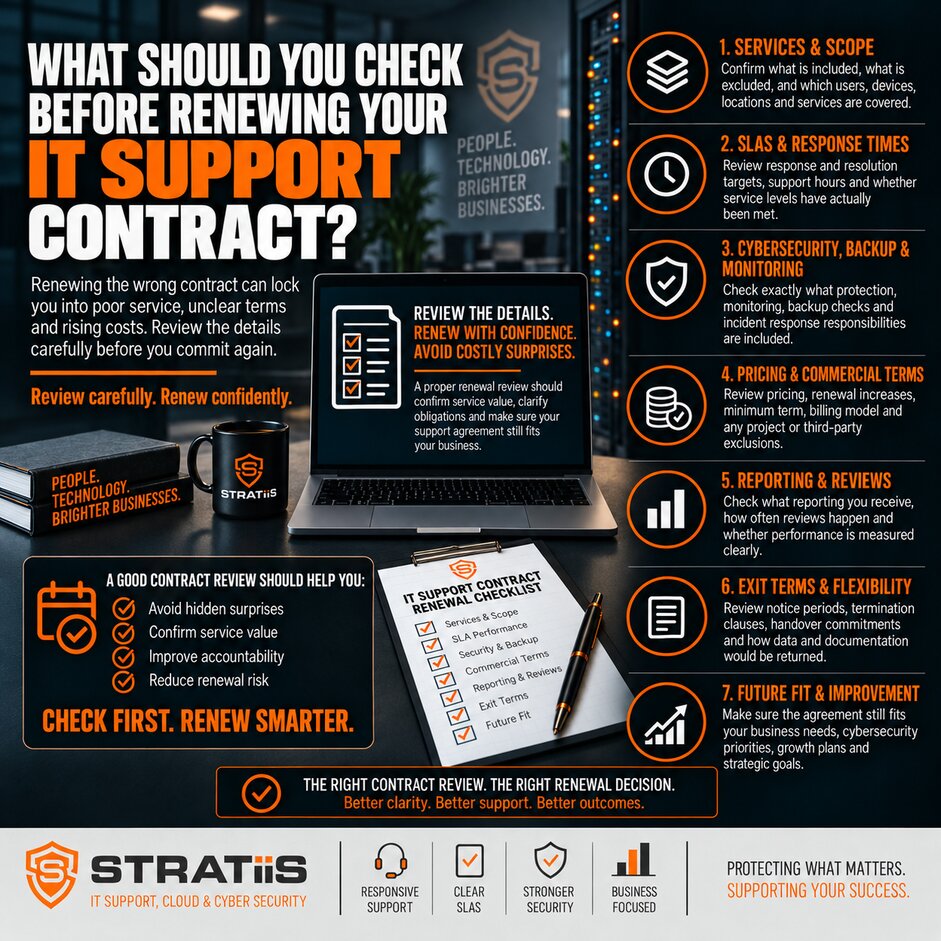
Before renewing an IT support contract, review whether the service still matches your organisation, whether promised outcomes have been delivered and whether the new commercial terms are clear. Check the service scope, support performance, cybersecurity, backups, technology condition, strategic advice, pricing and exit arrangements.
A renewal can feel administrative, particularly when the current provider has supported the business for several years. During that time, however, employee numbers, sites, Microsoft 365 use, remote working, applications, compliance obligations and reliance on technology may all have changed.
The short answer
Do not renew from the invoice alone. Start the review before the notice deadline, compare the written agreement with the service actually delivered, gather evidence from reports and users, identify current risks and future plans, then decide whether to renew, renegotiate or benchmark alternatives.
In this guide
Chapter 1
Start Before the Notice Deadline
Find the contract end date, notice period and automatic renewal mechanism first. Work backwards to allow enough time for an internal review, a meeting with the provider and any negotiation or benchmarking. Missing the notice date can commit the organisation to another term before leaders have assessed the service.
Collect the evidence
Gather the agreement, schedules, invoices, service reports, security findings, asset records and project charges from the current term.
Ask the business
Speak to managers and regular support users about recurring problems, communication, resolution quality and unmet needs.
Set the decision date
Leave time to renew, renegotiate or move provider before the contractual notice deadline.
A useful starting point is the current managed IT support agreement. It should make the service boundary, responsibilities, response targets, charges and exit process clear.
Chapter 2
Check Whether the Service Still Fits the Business
Compare the environment now with the one described when the contract began. Confirm current users, devices, servers, sites, remote workers, applications, cloud services and working hours. Include recent acquisitions, new compliance requirements and plans for the next 12 to 36 months.
| Renewal area | What to verify | Why it matters |
|---|---|---|
| Service scope | Helpdesk, remote and on-site support, Microsoft 365, monitoring, patching, networks, security, backup and reviews. | Expectations can drift away from the written contract. |
| Covered quantities | Users, devices, servers, sites, licences and backup accounts billed today. | Former staff, retired devices and unused licences can create waste. |
| Exclusions | Projects, office moves, migrations, hardware, cabling, out-of-hours work, recovery and specialist consultancy. | Regular additional invoices may show that the current service model is too narrow. |
| Future change | Growth, new locations, hybrid work, applications, cloud, automation and compliance plans. | The renewed service should support the organisation you are becoming. |
Compare the current wording with what is actually included in fully managed IT support. If the service no longer fits, use questions to ask before choosing a managed IT provider to structure the renewal discussion.
Chapter 3
Review Support Performance and User Experience
Ask for service data from the whole contract period. Examine ticket volumes, response performance by priority, long-running incidents, escalations and reopened tickets. An average can hide poor handling of a few serious incidents, so review examples as well as headline percentages.
| Evidence | Question for the renewal review |
|---|---|
| Response | Were critical and high-priority requests acknowledged and investigated within the agreed service levels? |
| Resolution | How long did issues remain open, and did difficult cases reach the right specialist promptly? |
| Communication | Did users receive clear ownership, useful updates and confirmation that the issue was resolved? |
| Prevention | Were recurring faults permanently addressed or repeatedly closed and reopened? |
| User experience | Is support easy to contact, and do employees trust the team to help? |
Use What Response Times Should You Expect From an IT Support Provider? to interpret the SLA. A quick acknowledgement is useful, but sustained ownership, resolution and communication determine the user experience.
Chapter 4
Reassess Cybersecurity, Backup and Recovery
Security requirements change as threats, systems and working practices change. Renewal is the point to confirm what is installed, what is actively managed and who responds when something suspicious happens. Review endpoint detection and response, email security, multi-factor authentication, Conditional Access, vulnerability management, awareness training and security reporting.
Active monitoring
Who receives endpoint, identity and Microsoft 365 alerts, how quickly are they investigated and how are incidents escalated?
Backup coverage
Which servers, applications and Microsoft 365 workloads are protected, how long is data retained and who monitors failures?
Recovery evidence
When was the last restore test, what was recovered, how long did it take and were problems corrected?
The disaster recovery plan should reflect current systems, people, sites and suppliers. It should identify recovery priorities, decision makers and realistic recovery objectives. Confirm that cybersecurity services and recovery responsibilities are documented rather than assumed.
Chapter 5
Review Technology, Licences, Documentation and Ownership
Request a current asset and service inventory. It should show computers, servers, mobile devices, network equipment, operating systems, warranties, users, locations and expected replacement dates. Ask for patch compliance and a clear plan for unsupported or ageing technology.
| Control | Evidence to request | Renewal outcome |
|---|---|---|
| Device management | Complete inventory, monitoring coverage, security policies and missing devices. | Every supported device has a known owner and management state. |
| Patching | Windows, server, third-party software, firewall and network patch compliance. | Exceptions and failed updates have an owner and remediation date. |
| Lifecycle | End-of-life, out-of-warranty and underperforming equipment with cost forecasts. | Replacement becomes planned investment rather than an emergency. |
| Documentation | Network diagrams, Microsoft 365, backups, security controls, suppliers and administrative records. | Incidents and future transitions do not depend on one person’s memory. |
| Ownership | Organisation-controlled Microsoft 365 tenant, domains, DNS, cloud accounts, backup data and subscriptions. | The business retains appropriate access and control. |
Review Microsoft 365, backup, security and other software subscriptions for former employees, duplicate licences, unsuitable plans and applications no longer used. Savings should be balanced against business requirements and security rather than achieved by removing necessary controls.
Chapter 6
Test the Provider’s Strategic Value
A managed service should help the organisation plan as well as respond to faults. Review meetings should turn technical evidence into business decisions about risk, budgets, projects, lifecycle, cloud services and growth. If meetings are only a list of closed tickets, ask for a more useful agenda.
Operational review
Ticket trends, SLA performance, recurring issues, security findings, backup status, patching and outstanding actions.
Forward plan
Technology roadmap, cybersecurity priorities, hardware investment, Microsoft 365, continuity, new sites, AI and automation.
Use What Should Business Leaders Ask During an MSP Review Meeting? to test the discussion. Where the organisation needs structured planning and budget guidance, confirm whether this is included or provided through Strategic vCIO Services.
Chapter 7
Examine Pricing and Contract Terms
Compare the current monthly cost, the proposed renewal price and every additional charge from the previous twelve months. Include licences, on-site visits, projects, user setup, installations, security remediation, backup restores and out-of-hours support. An increase can be reasonable where coverage or costs have changed, but it should be explained.
Compare the total service and outcomes with How Much Should Managed IT Support Cost for a 10–100 Employee Business in Scotland?. A low headline fee can offer poor value when essential security, recovery or support activities are charged separately.
Even when you intend to renew, the exit schedule should explain how the provider will supply documentation, transfer credentials and licences, cooperate with an incoming MSP, remove tools and privileged access, and provide relevant backup data.
Chapter 8
Decide Whether to Renew, Renegotiate or Switch
A good relationship does not require a change for its own sake. Renew when the provider remains a strong fit, the service evidence is sound and the next term addresses current risks and plans. Renegotiate when the relationship works but scope, quantities, reporting or terms need correction.
Benchmark the market when you need context on coverage, security standards, technology and pricing. How Do You Compare Managed IT Support Providers? provides a consistent evaluation method.
Consider a change where problems form a sustained pattern: repeated SLA failure, unresolved recurring issues, weak security, poor communication, hidden charges, missing documentation, little strategic advice or resistance to reasonable improvement. Read The 7 Warning Signs Your Business Has Outgrown Its Current IT Provider. If change is justified, How to Switch IT Providers Without Disrupting Your Business explains how to prepare the transition.
A Practical IT Support Renewal Scorecard
Score each area from 1 to 5 using evidence from the current term. Add an action owner and deadline for every weak area before signing the renewal.
| Area | Evidence | Decision test |
|---|---|---|
| Service fit | Scope, exclusions, current users, devices, sites and future plans. | Does the renewed service match the current business? |
| Support | SLA data, resolution, escalation, recurring issues and user feedback. | Does support produce reliable outcomes? |
| Security and recovery | Controls, monitored alerts, backups, restore tests and recovery plan. | Are important risks actively managed? |
| Technology | Assets, patching, lifecycle, licences, documentation and ownership. | Is the environment visible and supportable? |
| Strategy | Review actions, roadmap, budgets and evidence of proactive advice. | Is the provider helping the business plan? |
| Commercial | Total cost, extras, term, notice, renewal and exit arrangements. | Are value, flexibility and obligations clear? |
Common Questions About IT Support Renewals
Should we automatically renew if service is acceptable?
No. A short review can confirm that scope, quantities, risks and terms remain suitable and gives both parties a clear plan for the next period.
Should we get alternative quotations?
Benchmarking can be useful when pricing, scope or performance is unclear. Compare equivalent outcomes and exclusions rather than headline fees alone.
What should the renewal meeting produce?
A documented decision, updated scope and quantities, agreed improvement actions, current risks, planned investments and confirmed commercial dates.
Reviewing an IT Support Contract in Scotland?
Stratiis can help assess your current environment, identify service and security gaps, benchmark the agreement and define what the next contract should deliver.


