
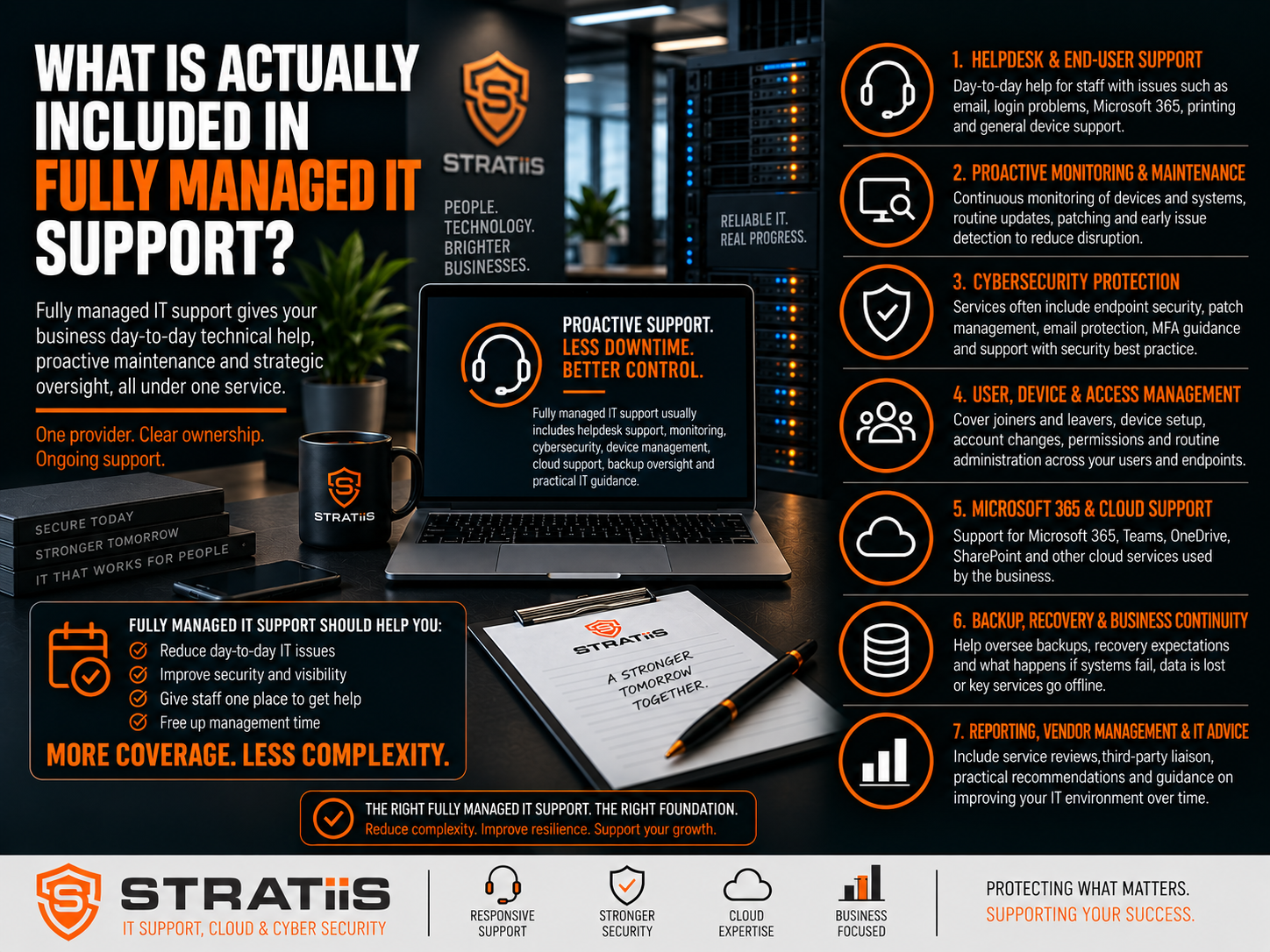
Fully managed IT support should give a business one accountable partner for day-to-day technical support, proactive maintenance, cybersecurity oversight and technology planning. However, the phrase “fully managed” is not a standard specification, so the exact coverage can vary significantly between providers.
One managed service provider may offer little more than helpdesk access, device monitoring and basic Microsoft 365 administration. Another may include endpoint security, backup monitoring, network management, vendor coordination, reporting, lifecycle planning and strategic reviews.
The important question is therefore not whether a service is described as fully managed. It is whether the scope, responsibilities, exclusions and outcomes are clearly defined.
Seven areas a fully managed IT service should normally address
Helpdesk and end-user support · Proactive monitoring and maintenance · Cybersecurity protection · User, device and access management · Microsoft 365 and cloud support · Backup, recovery and continuity · Reporting, vendor management and strategic advice
In this guide
1. Helpdesk, remote and on-site support
2. Proactive monitoring and maintenance
3. Cybersecurity and identity protection
4. Users, devices and Microsoft 365
5. Backup, recovery and continuity
6. Reporting, reviews and strategic planning
7. Exclusions, licences and pricing
Managed IT compared with other support models
Questions to ask before choosing a provider
What Does Fully Managed IT Support Mean?
Fully managed IT support usually means an external managed service provider, or MSP, takes primary responsibility for supporting and managing an organisation’s core IT environment. The MSP becomes the main point of contact instead of the customer coordinating several suppliers or relying on non-technical staff to resolve technology problems.
| Area | Typical coverage | The outcome |
|---|---|---|
| People | Employees, new starters, role changes, leavers and remote workers. | Users receive help and appropriate access without unnecessary delay. |
| Devices | Laptops, desktops, servers, mobile devices and shared workstations. | Technology remains supportable, secure and visible. |
| Platforms | Microsoft 365, cloud services, networks, Wi-Fi and core applications. | Systems are administered and issues have a clear owner. |
| Protection | Endpoint, identity, email, patching, backup and security monitoring. | Risk is reduced and important controls are actively managed. |
| Improvement | Reporting, reviews, budgeting, lifecycle planning and technology roadmaps. | IT decisions become proactive rather than urgent and reactive. |
Chapter 1
Helpdesk, Remote and On-Site Support
The helpdesk is the most visible part of a managed service. Employees need a reliable way to obtain help with passwords, Microsoft 365, Outlook, Teams, printers, devices, applications, access and connectivity.
01
Structured helpdesk
Users should be able to raise requests by telephone, email or support portal. A ticketing system should record ownership, priority, progress and resolution.
02
Secure remote support
Most application, configuration, performance and access issues can be investigated remotely, allowing problems to be resolved quickly and consistently.
03
On-site assistance
Physical cabling, failed network equipment, hardware installation and some infrastructure faults may require an engineer to attend the location.
| Support detail | What should be clear | Why it matters |
|---|---|---|
| Contact methods | Telephone, email, portal and automatically generated monitoring alerts. | Users know how to get the right level of help. |
| Support hours | Standard hours, public holidays and any evening, weekend or 24/7 options. | Coverage matches the hours the business actually operates. |
| On-site terms | Included visits, call-out charges, travel, location limits and expected attendance. | Multi-site organisations avoid unexpected cost or gaps. |
| Escalation | How complex, urgent or security-related incidents reach senior specialists. | Important problems do not remain stuck at first-line support. |
Chapter 2
Proactive Monitoring and Maintenance
A managed service should not wait for users to notice every problem. Monitoring and maintenance help the provider identify failing backups, low storage, missing updates, unhealthy devices and unavailable services before the impact becomes more serious.
| Capability | What it may include | Question to ask |
|---|---|---|
| Monitoring | Device health, servers, disk capacity, network equipment, backup status, security software, connectivity and performance. | Which systems are monitored, and what happens when an alert is generated? |
| Device management | Hardware inventory, software deployment, configurations, security policies, remote tools and Microsoft Intune. | Which company-owned and mobile devices are within scope? |
| Patch management | Windows, Microsoft applications, servers, browsers, third-party software, firewalls and security tools. | How are critical security updates prioritised and exceptions handled? |
| Network management | Firewalls, switches, wireless access points, routers, VPNs, segmentation and site-to-site links. | Who owns configuration, firmware, rule changes and troubleshooting? |
| Connectivity support | Diagnosing outages, managing routers, logging supplier faults and coordinating escalation. | Does the MSP also supply the connection or liaise with the provider? |
| Documentation | Network diagrams, device and server details, cloud configuration, suppliers, backups, security controls and administrative information. | Is documentation maintained, protected and available during incidents or provider change? |
Vendor management can be one of the most valuable parts of a fully managed service. A capable MSP may coordinate internet, software, telecoms, printer and specialist application suppliers so business managers are not repeatedly passed between providers.
Chapter 3
Cybersecurity and Identity Protection
Cybersecurity should be present in a modern managed service, but the level varies. Installing security software is not the same as actively reviewing alerts, managing risk and responding when suspicious activity is detected.
| Security area | Possible managed coverage | What to verify |
|---|---|---|
| Endpoint protection | Antivirus, Endpoint Detection and Response, ransomware protection and managed detection. | Which product is used and who actively monitors alerts? |
| Email security | Spam, phishing, malicious-link and attachment scanning, impersonation protection and anti-spoofing controls. | Is advanced email security included or an additional service? |
| Identity security | Multi-factor authentication, Conditional Access, password and lockout policies, administration and permissions. | How are privileged accounts and risky sign-ins controlled? |
| Security monitoring | Endpoint, Microsoft 365, suspicious login, vulnerability and other security alerts. | What happens when suspicious activity is identified? |
| Vulnerability management | Scanning computers, servers, networks and software for known weaknesses and prioritising remediation. | Is scanning included, how often is it performed and who owns remediation? |
| People and certification | Security awareness, simulated phishing and support for Cyber Essentials controls. | Which training and certification activities are included? |
Businesses should compare the proposed controls with their actual risks rather than assuming “IT support” provides comprehensive protection. Our guide to cybersecurity protections for a 50-person business explains the distinction in more detail.
Chapter 4
Users, Devices and Microsoft 365
Microsoft 365 is often one of the most important environments managed by an MSP. Coverage may include account creation, licences, Exchange Online, Teams, OneDrive, SharePoint, password resets, security settings and multi-factor authentication.
JOIN
New starters
Create accounts, assign licences, configure devices, provide application access, set permissions and apply security policies.
MOVE
Role changes
Update group membership, licences, permissions, devices and access as responsibilities change.
LEAVE
Departing employees
Disable accounts, revoke sessions, remove access, secure data, transfer files and configure email delegation where approved.
A structured joiner, mover and leaver process improves consistency and can significantly reduce security risk. The exact division of responsibility between the customer’s managers, HR team and MSP should be documented.
Chapter 5
Backup, Recovery and Business Continuity
Backup assumptions are dangerous. A provider may monitor an existing backup while licences, storage, Microsoft 365 backup and advanced recovery services are charged separately. The scope should identify every protected system.
Backup
Creates recoverable copies of server, cloud, Microsoft 365, file or application data and checks whether scheduled jobs complete successfully.
Disaster recovery
Defines how systems and data will be restored, the order of recovery, expected timescales, responsibilities, testing and documentation.
| Question | The service should explain |
|---|---|
| What is protected? | Servers, files, applications, cloud platforms and Microsoft 365 workloads within scope. |
| How frequently? | Backup schedules, retention periods and any different treatment for critical systems. |
| Who monitors it? | How failures are detected, investigated, escalated and reported. |
| How is recovery handled? | Restore requests, recovery priorities, testing and any separate disaster-recovery platform. |
| What outcomes are expected? | Agreed recovery-time and recovery-point objectives where the business has specific continuity requirements. |
Chapter 6
Reporting, Reviews and Strategic Planning
Fully managed IT should not operate entirely through support tickets. Management needs visibility of service performance, recurring problems, risk and future investment.
REPORT
Useful management information
Ticket trends, response performance, device health, patching, backups, cybersecurity findings, vulnerabilities, assets and recommendations.
REVIEW
Regular service meetings
Outstanding issues, recurring problems, service levels, security concerns, projects, Microsoft 365 changes and business growth.
PLAN
Strategic technology guidance
Budgets, cybersecurity priorities, roadmaps, cloud, equipment replacement, new locations, acquisitions, AI, automation and continuity.
The most useful reporting turns technical data into clear business actions. More mature services may deliver strategic planning through a vCIO service, helping leaders anticipate costs and make technology decisions before they become urgent.
Hardware lifecycle planning should identify equipment that is old, unsupported, out of warranty, underperforming or becoming a security risk. For practical replacement guidance, read How Often Should Businesses Replace PCs, Servers and Network Equipment?
Chapter 7
Exclusions, Licences and Pricing
Even comprehensive managed services normally have boundaries. The objective is not to include every possible technology activity in one monthly charge. It is to ensure the customer understands the boundary before work begins.
| Often separate from the core fee | What to confirm |
|---|---|
| Major projects | Office moves, new-site installations, migrations, major SharePoint work, integration and transformation projects. |
| Infrastructure and hardware | New laptops, servers, networking, wireless surveys, structured cabling and installation charges. |
| Licences and cloud consumption | Microsoft 365, security, backup, remote-working and other software subscriptions. |
| Specialist work | Third-party consultancy, major cybersecurity remediation, out-of-hours projects and specialist applications. |
| Exceptional recovery | Large incident-response or disaster-recovery activity beyond the documented service. |
Some MSPs bundle licences and tools into a per-user price. Others separate managed-service, software, hardware and project charges. Neither model is automatically better; transparency and like-for-like comparison matter more than the billing structure.
Compare the coverage as well as the headline price. Our guide to managed IT support costs for a 10–100 employee business in Scotland explains the main pricing factors.
Fully Managed IT Compared With Other Support Models
| Break-Fix Support | Fully Managed IT |
|---|---|
| Primarily reactive | Proactive and reactive |
| Charged per incident or block of time | Regular monthly service fee |
| Limited monitoring and maintenance | Continuous monitoring and planned maintenance |
| Little strategic planning | Ongoing reviews and technology planning |
| The customer coordinates suppliers | The MSP often coordinates technology suppliers |
| Problems are fixed when reported | Problems may be identified before users notice |
Fully Managed IT
The MSP takes primary responsibility for IT operations. This often suits organisations without a dedicated internal IT team or those that want one accountable provider.
Co-Managed IT
An internal IT person or team retains agreed responsibilities while the MSP adds capacity, specialist skills, tools, security, projects or strategic support.
Who Is Fully Managed IT Best Suited To?
Fully managed IT can work particularly well for organisations that rely heavily on technology but do not want directors, managers or non-technical employees coordinating IT suppliers and resolving day-to-day problems.
What Questions Should You Ask a Fully Managed IT Provider?
The phrase “fully managed” should never replace a detailed explanation of the service. A strong managed IT support agreement should document the answers. Business leaders should also know what to ask during an MSP review meeting.
What Should Fully Managed IT Ultimately Deliver?
SUPPORT
Responsive help
Employees receive assistance when they need it.
RELIABLE
Maintained systems
Technology is monitored and kept supportable.
SECURE
Reduced risk
Systems are managed with cybersecurity in mind.
VISIBLE
Management insight
Leaders understand risks, performance and recurring issues.
PLAN
Forward planning
Future investment is discussed before it becomes urgent.
OWN
Clear accountability
One organisation coordinates the supported environment.
The real value of fully managed IT is not simply fixing computers. It is reducing the time, risk and uncertainty involved in operating business technology.
Looking for Fully Managed IT Support in Scotland?
Stratiis provides managed IT support, cybersecurity, Microsoft 365, cloud, connectivity and strategic technology services to businesses and organisations across Scotland. Our service combines responsive support with proactive monitoring, cybersecurity, lifecycle management and technology planning.
If you are comparing providers, reviewing your current MSP or want to understand what should be included, speak to Stratiis about a Managed IT and Cybersecurity Review.


