
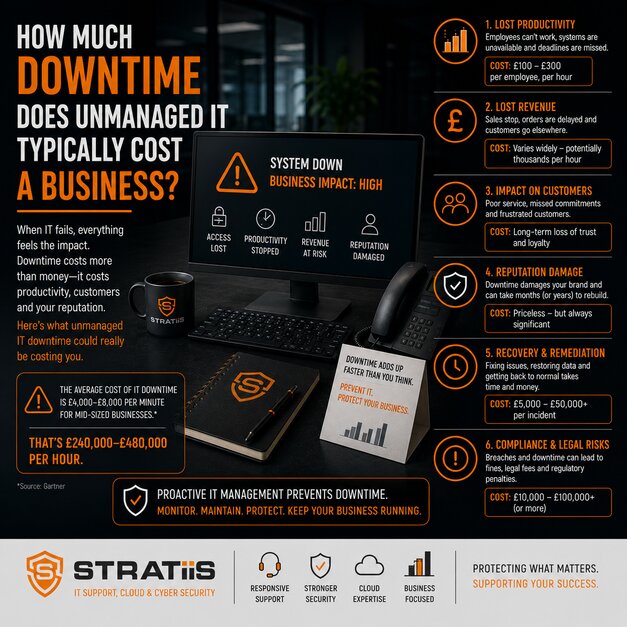
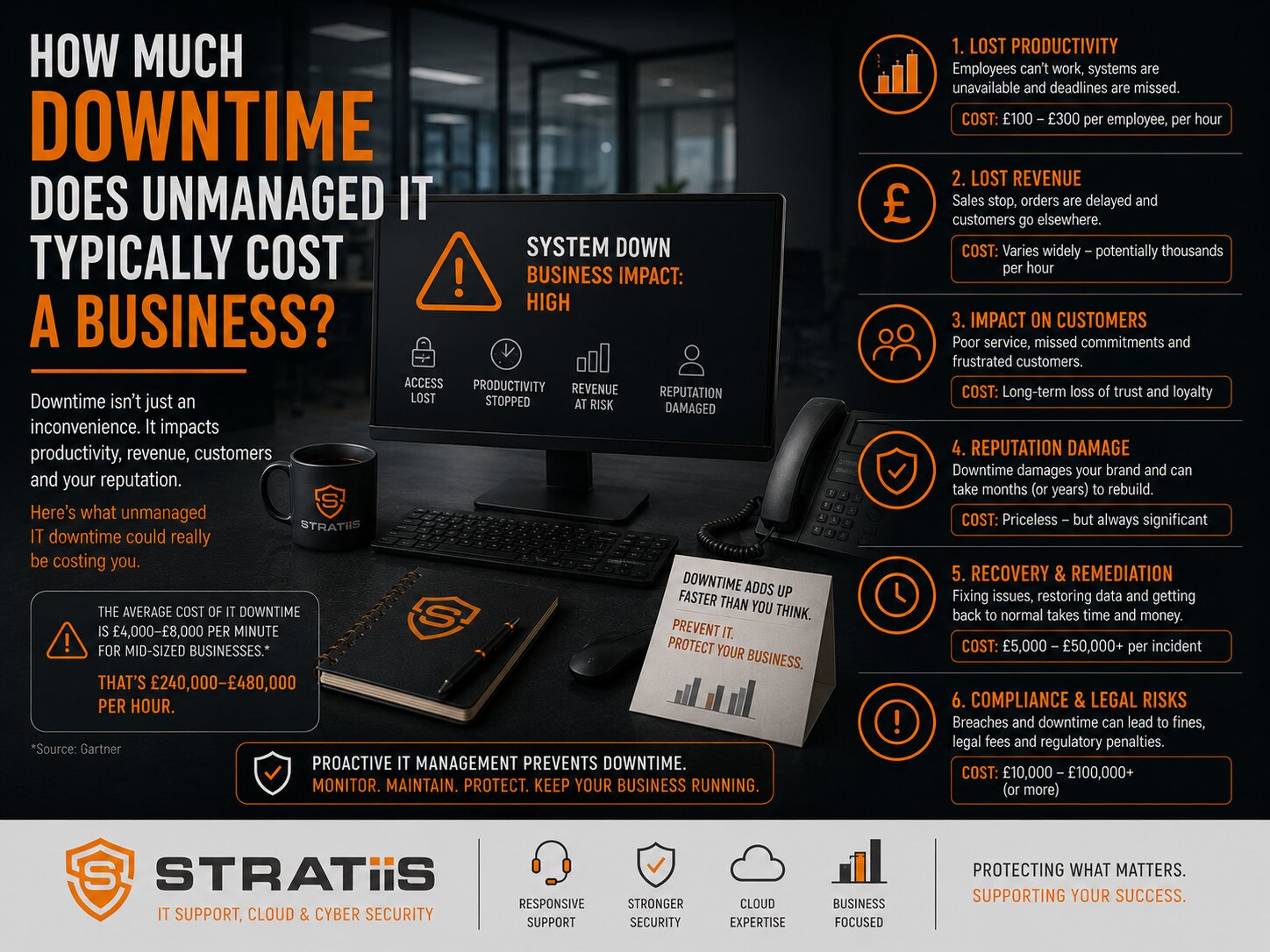
IT downtime costs more than the repair invoice. When people cannot access email, files, applications, devices or connectivity, the business also absorbs lost working time, delayed customer service, recovery effort and missed opportunities. Even short, recurring interruptions can create a material annual cost.
The short answer
A simple starting point is: affected employees × hourly employment cost × hours lost × percentage of productivity lost. Using an illustrative employment cost of £35,000 a year, one hour affecting 50 employees is about £900 in staff time alone. Four hours is about £3,600 and a 7.5-hour day about £6,750, before lost revenue, customer impact, overtime, recovery and reputational cost.
In this guide
What counts as downtime
The true cost of downtime
How to calculate the cost
Illustrative cost table
Costs beyond staff time
The five main causes
Reactive versus managed IT
How managed support reduces downtime
What resilience looks like
Warning signs in your business
What to do next
THE REACTIVE MODEL
What Is Unmanaged IT?
Unmanaged IT describes an environment where technology is mainly addressed after something fails. Support may still be available, but monitoring, maintenance, cybersecurity, lifecycle planning and documented ownership are inconsistent or absent.
Problems drive activity
Technical work begins after employees report disruption rather than when monitoring identifies an early warning.
Ownership is fragmented
Internal staff, suppliers and support providers are uncertain who owns systems, risks or the next action.
Investment becomes urgent
Maintenance, security and replacement are delayed until failure forces an immediate decision.
This approach can appear inexpensive because planned management is limited. The hidden cost appears elsewhere through recurring faults, employee time, emergency work and avoidable interruption.
MORE THAN A TOTAL OUTAGE
What Counts as IT Downtime?
Downtime occurs whenever technology prevents people or processes from working normally. The whole organisation does not need to stop for the cost to be real.
Communication outage
Employees cannot send or receive messages, access calendars or coordinate customer work.
Internet or network failure
Cloud applications, voice services, remote access and shared systems become unavailable.
Server or application failure
A finance, case, production, CRM or document system prevents a team from completing essential work.
Security incident
Accounts, devices or services are isolated while ransomware, malware or suspicious access is investigated.
Slow or failed equipment
Individual employees lose time through unreliable laptops, storage, Wi-Fi or peripherals.
Microsoft 365 disruption
Users lose access to identity, files, Teams, SharePoint, OneDrive or productivity applications.
BUSINESS IMPACT
What Is the True Cost of IT Downtime?
The direct employment cost is the easiest component to estimate, but it is only one part of the impact. The total depends on which people and processes are affected, whether work can continue safely and how long recovery takes.
People wait, repeat work, use slower alternatives or cannot complete their role.
Enquiries, cases, transactions, appointments or deliveries take longer.
Sales activity, billable work, production and payment processing may stop.
Employees, managers and suppliers spend additional time restoring systems and records.
Service commitments, reporting duties or regulatory obligations may be missed.
Customers and employees may lose trust after repeated or poorly managed disruption.
These effects overlap. A useful estimate should avoid double counting while still capturing the material consequences for the organisation.
A PRACTICAL ESTIMATE
How Do You Calculate the Cost of Downtime?
Use a transparent calculation that can be adjusted for different incidents. Start with the people affected, their approximate employment cost and the time genuinely lost.
Staff-time cost = affected employees × hourly employment cost × hours affected × productivity loss
Add measurable revenue loss, recovery cost, overtime, supplier charges, penalties and other business impact separately.
| Input | How to estimate it | Common mistake |
|---|---|---|
| Affected employees | Count only people whose work was stopped or materially reduced. | Using total headcount for a team-specific outage. |
| Hourly employment cost | Annual employment cost divided by productive working hours. | Using salary alone and ignoring employer costs where relevant. |
| Hours affected | Include waiting, workarounds, recovery and repeated effort. | Measuring only the technical outage window. |
| Productivity loss | Use 100% when work stops; use a lower percentage where safe alternatives exist. | Assuming every affected person lost all productivity. |
| Other impact | Add evidenced revenue, recovery, supplier, overtime and contractual costs. | Presenting staff time as the entire business cost. |
For an employee costing £35,000 a year over 1,950 working hours, the illustrative hourly employment cost is approximately £18.
ILLUSTRATIVE COSTS
How Much Could One IT Outage Cost?
The figures below show staff-time cost where every listed employee loses all productivity. They use an illustrative £18 hourly employment cost and a 7.5-hour working day.
| Affected employees | 1 hour | 4 hours | 7.5-hour day |
|---|---|---|---|
| 10 | £180 | £720 | £1,350 |
| 25 | £450 | £1,800 | £3,375 |
| 50 | £900 | £3,600 | £6,750 |
| 100 | £1,800 | £7,200 | £13,500 |
50-person example
50 employees × £18 × 4 hours = approximately £3,600 in lost staff time.
25% productivity loss
If safe workarounds preserve 75% of productivity, the same four-hour event produces an estimated £900 staff-time loss.
COMMON FAILURE PATTERNS
What Are the Five Main Causes of Business Downtime?
Hardware failure
Ageing servers, devices, firewalls, switches and storage are more likely to fail without warning or support.
Cybersecurity incidents
Ransomware, compromised accounts and malware can interrupt operations for hours, days or longer.
Human error
Accidental deletion, incorrect permissions, configuration changes and missed procedures can affect critical services.
Software and change
Unsupported applications, failed updates and poorly planned changes can create avoidable disruption.
Network and connectivity
Internet, Wi-Fi, firewall and supplier failures can stop cloud-based work across a site.
These causes are not fully preventable, but monitoring, maintenance, testing, lifecycle planning and clear ownership reduce their likelihood and impact.
COMPARE THE OPERATING MODELS
How Does Reactive IT Compare With Managed IT Support?
| Area | Reactive or unmanaged approach | Managed approach |
|---|---|---|
| Monitoring | Users report problems after disruption begins. | Alerts identify developing faults and named people respond. |
| Maintenance | Updates and health checks are inconsistent. | Maintenance, patching and configuration follow an agreed process. |
| Security | Controls are added after incidents or external pressure. | Risk, identity, devices, awareness and recovery are reviewed regularly. |
| Lifecycle | Equipment is replaced after failure or urgent concern. | Age, support status, capacity and budgets inform planned replacement. |
| Recovery | Backup success is assumed to mean the business can recover. | Coverage, retention, alerts, priorities and restore evidence are reviewed. |
| Improvement | Recurring tickets are repeatedly resolved. | Trends and root causes drive permanent corrective work. |
The aim is broader than fixing incidents quickly. A mature service reduces avoidable demand and limits the business impact of events that still occur.
REDUCE FREQUENCY AND IMPACT
How Does Managed IT Support Reduce Downtime?
Managed support combines prevention, early detection, controlled response and forward planning. No provider can promise zero downtime, but it should reduce exposure and improve recovery.
Health, capacity and security alerts are reviewed before users report failure.
Patches, updates and configuration are managed through a repeatable process.
Recurring issues lead to investigation and permanent improvement.
Identity, endpoint, email and network controls are actively maintained.
Coverage is monitored and important systems are restored in testing.
Lifecycle, capacity, risk and projects are addressed before they become emergencies.
Review What Is Actually Included in Fully Managed IT Support? when comparing the scope behind a managed service.
BUSINESS RESILIENCE
What Does Good Business Continuity Look Like?
Business continuity is the organisation's ability to keep priority activities running and recover within acceptable time. Technology supports this, but leadership must define priorities and acceptable disruption.
Critical services are identified
Leaders know which processes, systems, people and suppliers must recover first.
Controls are actively managed
MFA, endpoint protection, patching, monitoring and awareness reduce preventable incidents.
Backups are proven
Coverage, retention, access and recent restore tests support the required recovery sequence.
Roles are documented
Technical, leadership, communication, supplier and regulatory responsibilities are clear.
Workarounds are practical
Priority teams know how to continue safely when normal systems are unavailable.
Plans are exercised
Scenarios and restores reveal assumptions before a real incident exposes them.
PRACTICAL EXAMPLE
Reducing Downtime for a 30-Person Scottish Business
A growing organisation was experiencing slow devices, repeat support issues, limited monitoring and no documented technology roadmap. The direct support cost was visible, while lost employee time and frustration were largely unmeasured.
What changed
The organisation introduced proactive monitoring, a device refresh programme, Microsoft 365 improvements, stronger security controls and planned technology reviews.
The outcome
Support incidents and downtime reduced, resolution improved and leadership gained better visibility of assets, risks and future investment.
The greatest value came from avoiding repeat disruption rather than only closing tickets more quickly.
CHECK YOUR ENVIRONMENT
What Are the Warning Signs That Downtime Costs More Than You Think?
Recurring problems suggest symptoms are being addressed without removing the cause.
Small delays accumulate across every user, task and working day.
Urgent work carries more risk, cost and operational disruption than planned change.
Backup exists, but nobody can show when important systems were last restored.
Leadership sees support invoices but cannot quantify employee or customer impact.
Known lifecycle, capacity and security issues remain until failure forces action.
These patterns may also indicate that the organisation has outgrown its current support arrangement. Read The 7 Warning Signs Your Business Has Outgrown Its Current IT Provider.
MEASURE AND IMPROVE
What Should a Business Do Next?
Begin with evidence from recent incidents and recurring delays. A small amount of consistent measurement helps leadership decide where prevention, resilience or support changes will deliver the most value.
Record disruption
Capture affected people, systems, duration, productivity loss, customer impact and recovery effort.
Identify root causes
Separate repeat issues, lifecycle gaps, supplier failures, security events and change problems.
Prioritise business risk
Rank improvements by operational impact, likelihood, cost, dependency and time to reduce risk.
Define recovery needs
Agree which services must return first and the maximum acceptable outage and data loss.
Plan lifecycle and resilience
Schedule replacement, failover, backup testing, security and supplier improvements.
Review results
Track incident frequency, duration, impact and completed actions in MSP review meetings.
FREQUENTLY ASKED QUESTIONS
Questions About IT Downtime Costs
Is there a standard cost per hour of downtime?
No. Cost depends on affected employees, customer impact, revenue, sector, timing, workarounds and recovery effort. Use your own assumptions and document them.
Should salary be used in the calculation?
Salary can provide a simple estimate. A fuller employment cost may include employer contributions and benefits, divided by productive working hours.
Does slow technology count as downtime?
Yes, when it reduces productive work. Repeated small delays can create a significant annual cost even though no single event looks like an outage.
Can managed IT eliminate downtime?
No provider can remove every failure. Managed IT should reduce preventable incidents, identify problems earlier and improve response and recovery.
How should lost revenue be estimated?
Use finance and operational evidence such as delayed transactions, unbilled work, lost production or missed appointments, while avoiding double counting.
How often should downtime be reviewed?
Material events should be reviewed promptly. Trends, root causes and improvement actions should form part of regular service and risk reviews.
How Much Is IT Disruption Costing Your Business?
Stratiis can review recurring issues, resilience, cybersecurity and lifecycle risks, then build a practical plan to reduce preventable downtime.


