
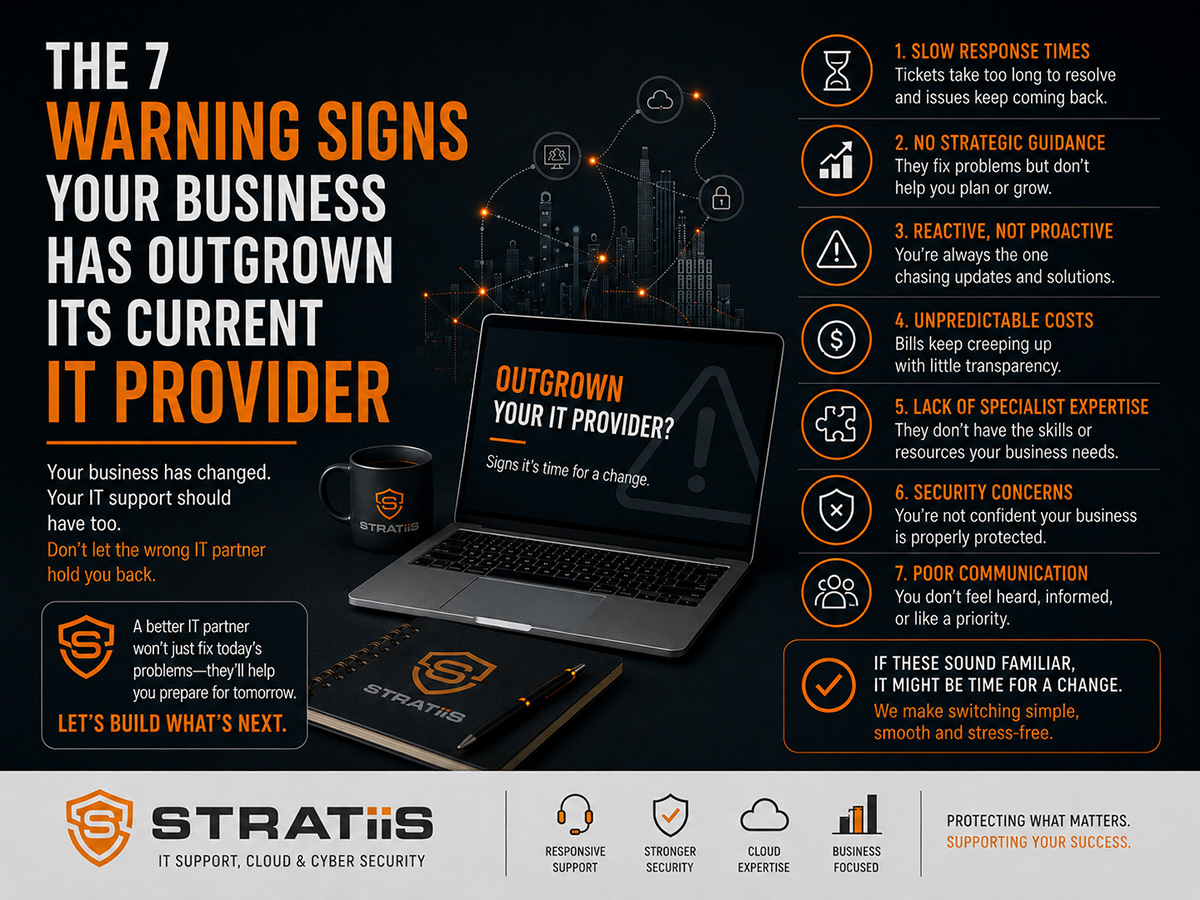
Businesses rarely change IT provider because of one bad experience. The decision usually follows a pattern: recurring faults, slow responses, weak security guidance, unpredictable costs and little planning. If the service no longer keeps pace with the organisation's size, risk or ambitions, the business may have outgrown its current provider.
The short answer
The clearest warning signs are recurring problems, cybersecurity treated as an extra, no strategic advice, response times that no longer fit the business, poor cost visibility, underused Microsoft 365 and limited understanding of the organisation's sector. One issue may be recoverable. Several persistent signs justify a structured review of the service, agreement and available alternatives.
In this guide
1. Problems keep returning
2. Security is an optional extra
3. No strategic advice
4. Response no longer fits
5. Costs remain unclear
6. Microsoft 365 is underused
7. Limited sector understanding
The business impact
What a growing business should expect
Self-assessment scorecard
What to do next
THE CHANGING REQUIREMENT
Why Businesses Outgrow Their IT Provider
A provider can be a good fit at one stage and struggle at another. As headcount, locations, applications and customer expectations grow, the organisation usually needs more structured support, stronger cybersecurity, better reporting, Microsoft 365 expertise, compliance assistance and forward planning.
More users and locations
More employees, remote workers and sites create additional devices, access requests, suppliers and support demand.
Higher security exposure
More identities, information and dependencies increase the need for managed protection, monitoring and recovery.
Greater need for direction
Technology decisions affect budgets, productivity, compliance and growth, so reactive support alone becomes insufficient.
WARNING SIGN 1
Technology Problems Keep Returning
Every business experiences occasional faults. Repeated email problems, unreliable Wi-Fi, device failures, printer issues or recurring Microsoft 365 tickets suggest that symptoms are being fixed without addressing the underlying cause.
What you may notice
The same incidents reopen, temporary workarounds become normal, users lose confidence and ticket volumes remain high even after repeated fixes.
What good looks like
The provider identifies root causes, reviews trends, documents known problems, implements permanent improvements and shows that recurring demand is falling.
Support should become more stable over time. If preventable issues keep consuming employee time, the service may lack proactive monitoring, problem management or ownership.
WARNING SIGN 2
Cybersecurity Is Treated as an Optional Extra
Cybersecurity should be part of how identities, devices, email, networks, Microsoft 365 and backups are managed. If security is discussed only after an incident or renewal, the organisation may be carrying risks that nobody has clearly assessed.
| Question | Evidence to expect | Concern if absent |
|---|---|---|
| Are important accounts protected? | MFA coverage, Conditional Access, administrator controls and regular access reviews. | Compromised credentials may provide broad access. |
| Are devices actively protected? | Managed endpoint security, patch status, encryption and alert ownership. | Threats or vulnerable devices may remain unseen. |
| Can the organisation recover? | Documented backup coverage, monitoring, retention and recent restore tests. | A successful backup job may be mistaken for proven recovery. |
| Are people prepared? | Awareness training, phishing guidance and clear incident reporting routes. | Employees may not recognise or escalate suspicious activity. |
A capable provider should discuss risk, emerging threats, compliance needs and practical improvement. Review the wider protection a growing organisation may need through How Much Cybersecurity Protection Does a 50-Person Business Actually Need?
WARNING SIGN 3
You Never Receive Strategic Advice
Resolving tickets is essential, but a growing business also needs guidance. If every conversation is about the latest incident, the organisation may have no view of upcoming technology risks, investment or improvement.
Service performance, recurring problems, risk and planned changes are discussed with decision makers.
Projects, dependencies and priorities are mapped beyond the next urgent purchase.
Licences, lifecycle, security and project costs are forecast before they become urgent.
Recommendations reflect growth, sector requirements, working patterns and operational priorities.
Strategic support may be provided within a mature managed service or through dedicated leadership. See What Does a Strategic vCIO Do for a Growing Business and Is It Worth It?
WARNING SIGN 4
Response Times No Longer Meet Business Needs
What was acceptable for a small team may cause serious disruption once the organisation depends on technology for customer service, revenue, project delivery and daily operations. Response should reflect business impact rather than treating every ticket alike.
Questions to ask
How quickly are incidents acknowledged? How long do they remain unresolved? Are priorities clear? Do users receive useful updates? Can urgent issues reach the right specialist?
What good looks like
The agreement sets response targets, support hours and escalation routes. Tickets have visible ownership, priorities reflect impact and communication continues until resolution.
WARNING SIGN 5
You Have Little Visibility of IT Costs
Unexpected hardware failures, licence increases, emergency security work and unplanned projects make technology spending feel unpredictable. Some surprises are unavoidable, but repeated urgent expenditure often points to missing lifecycle and budget planning.
Forecast recurring costs
Show managed-service fees, licences, cloud use, connectivity and other subscriptions with expected changes.
Plan replacement cycles
Record age, warranty, support status and replacement priorities for devices and infrastructure.
Separate projects
Identify major migrations, office moves and improvements that sit outside routine support.
A mature provider should help leadership understand likely cost, timing and business value. For current pricing factors, read How Much Should Managed IT Support Cost for a 10–100 Employee Business in Scotland?
WARNING SIGN 6
Microsoft 365 Is Underused or Poorly Governed
Many organisations use Microsoft 365 mainly for email and desktop applications while collaboration, device management, identity protection and information controls remain inconsistent. This can create both wasted value and unmanaged risk.
Collaboration is fragmented
Teams, SharePoint and OneDrive have grown without clear ownership, structure or sharing rules.
Security features are missing
MFA, Conditional Access, Intune or Defender capabilities are absent, inconsistent or not actively managed.
Licences are not reviewed
Unused, duplicated or poorly matched subscriptions continue without a regular usage and requirement review.
The provider should help the organisation improve security, collaboration, adoption and licence value while maintaining clear governance. Explore Microsoft 365 Services for the wider management approach.
WARNING SIGN 7
Your Provider Does Not Understand the Organisation or Sector
A charity, law firm, manufacturer and construction company can use similar technology but face different operating pressures, information risks and supplier dependencies. Advice becomes less useful when the provider does not understand how the organisation works.
| Sector example | Typical considerations | What the provider should understand |
|---|---|---|
| Charities and nonprofits | Funding, governance, trustees, volunteers and sensitive information. | Proportionate control, cost and access for varied user groups. |
| Law firms | Client confidentiality, case systems, records and professional obligations. | Secure access, information governance and application dependencies. |
| Manufacturing | Operational resilience, specialist systems, production and supply chains. | Boundaries between business IT, operations and vendor support. |
| Construction | Sites, mobile teams, project data, connectivity and device security. | Field working, supplier access and support across changing locations. |
An effective MSP does not need to operate the client's specialist applications, but it should understand their business importance, technical dependencies, support ownership and risk.
THE COST OF WAITING
The Business Impact of Staying With the Wrong Provider
Poor IT service is rarely limited to technology. The hidden cost appears in lost time, delayed work, repeated management involvement, security exposure and decisions made without reliable information.
Employees lose time to recurring faults and workarounds.
Security, backup and unsupported systems remain unresolved.
Users stop reporting issues or create unsafe alternatives.
Known weaknesses become business interruptions.
Technology does not keep pace with growth or new ways of working.
Urgent replacement and remediation displace planned investment.
A MODERN MANAGED SERVICE
What Should a Growing Business Expect?
A modern MSP should combine responsive support with active management, security leadership and forward planning. The exact scope will vary, but responsibilities and outcomes should be clear.
Reliable day-to-day help
Clear contact routes, prioritisation, escalation, ownership and communication.
Proactive operations
Monitoring, maintenance, patching, documentation and issue prevention.
Cybersecurity leadership
Risk reviews, managed controls, recovery, awareness and improvement planning.
Microsoft expertise
Secure administration, collaboration, governance, adoption and licence review.
Strategic guidance
Roadmaps, lifecycle, budgets, projects and regular business reviews.
Business understanding
Recommendations linked to sector, operations, priorities and growth.
Compare the actual scope with What Is Actually Included in Fully Managed IT Support? before deciding whether the service is still suitable.
Self-Assessment Scorecard
Use these questions as a starting point for a management review. A “no” does not automatically mean the provider should be replaced, but several weak answers deserve investigation and an improvement plan.
| Review question | Healthy evidence | Your answer |
|---|---|---|
| Are recurring issues reducing over time? | Trend reporting and documented root-cause work. | Yes / No |
| Has cybersecurity been reviewed within the last 12 months? | Current findings, priorities, owners and target dates. | Yes / No |
| Do you have a documented technology roadmap? | Planned investment, projects and lifecycle decisions. | Yes / No |
| Can you explain next year's likely IT costs? | Recurring, lifecycle and project forecasts. | Yes / No |
| Do service reports support management decisions? | Performance, risk, recurring issues and clear actions. | Yes / No |
| Does the provider understand your organisation? | Advice reflects business priorities and sector requirements. | Yes / No |
| Could another provider take over from current records? | Controlled access, inventories, diagrams and supplier details. | Yes / No |
REVIEW BEFORE YOU SWITCH
What Should You Do Next?
Start with evidence. Review ticket trends, response and resolution, recurring problems, security findings, backup status, assets, planned costs and the actions from previous service meetings. Give the current provider a fair opportunity to explain the position and agree a time-bound improvement plan.
Define the requirement
Document users, locations, systems, support hours, security needs, projects and the business outcomes expected.
Review the current service
Compare the agreement, actual delivery, reporting, risks and unresolved priorities.
Compare alternatives fairly
Assess scope, capability, onboarding, security, governance and total cost rather than headline price alone.
If a change is required, use How to Switch IT Providers Without Disrupting Your Business to plan ownership, access, information and communications.
Has Your Business Outgrown Its IT Provider?
Stratiis can review the current service, identify operational and cybersecurity gaps, and help you decide whether improvement or a managed transition is the right next step.


